

Generale: in ADDLOCAL, elencare tutte le caratteristiche desiderate separate da virgole.
ADDLOCAL=Feature1,Feature2 ...
Esempio: devono essere installati ENTERPRISE 3Dfindit e NX Integration. L'integrazione deve essere attivata immediatamente.
ADDLOCAL=F.apps_psol_enterprise,F.CAD_NX,F.AutoActivateInterfaces
La seguente tabella Orca mostra tutte le caratteristiche che possono essere impostate in ADDLOCAL.
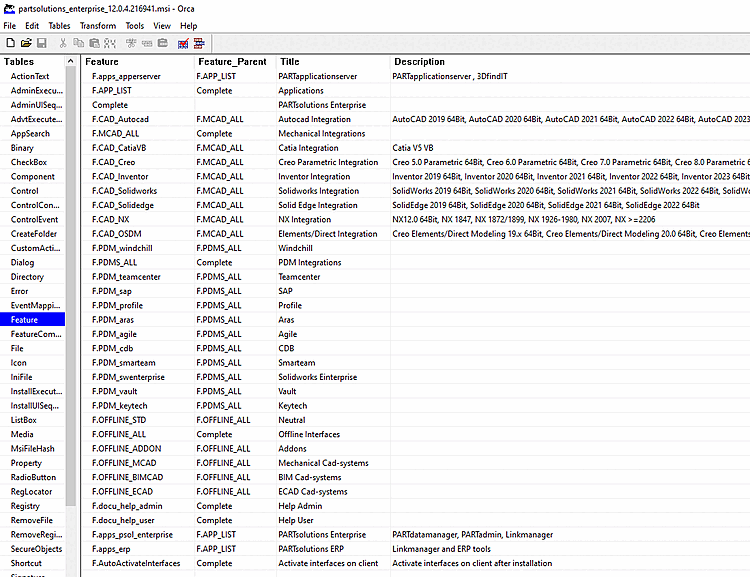
Le illustrazioni seguenti mostrano gli equivalenti nell'interfaccia utente (ENTERPRISE 3Dfindit, attivazione dell' integrazione NX e delle interfacce sul client ).
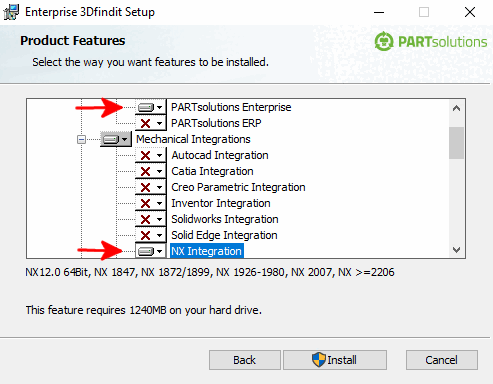
![Attivare le interfacce sul client [Enable interfaces on the client]](https://webapi.partcommunity.com/service/help/latest/pages/it/partwarehouse/doc/resources/img/img_887ce6c73b744fb8a9a8fdfa375f3037.png)
Attivare le interfacce sul client [Enable interfaces on the client] (F.AutoActivateInterfaces): Se i sistemi CAD sono già installati, è possibile risparmiare l'attivazione manuale attivando l'opzione. In PARTadmin, nella categoria Integrazione CAD [CAD integration], è possibile effettuare l'attivazione manuale anche in un secondo momento. Vedere anche Sezione 1.4.2, “ Integrazione CAD ”.
![Categoria "Integrazione CAD [CAD integration]](https://webapi.partcommunity.com/service/help/latest/pages/it/partwarehouse/doc/resources/img/img_4f1787c717a142d1819e9eb7f978dfc4.png)
Sotto ...\software\install\scripts
Script batch che possono essere eseguiti localmente in qualsiasi momento per
Abilita/disabilita le integrazioni. Questi possono anche essere amministrativamente
può essere utilizzato nel corso della distribuzione del software con distribuzione .