
1.3.6.6. Rimuovi / Ripristina / Mostra cronologia
1.3.6.6.1.
Mostra la cronologia / la cronologia dei prodotti per la sottodirectory
|  |
| Indietro | Avanti |
![[Nota]](https://webapi.partcommunity.com/service/help/latest/pages/it/partwarehouse/doc/images/note.png)
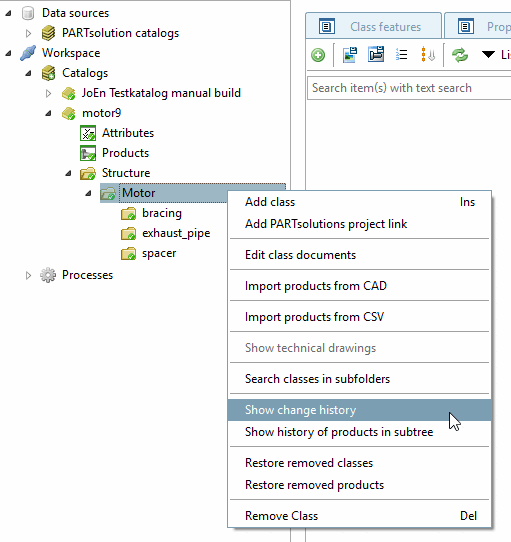
Esistono due comandi per visualizzare la cronologia:
Mostra la cronologia [Show change history]: Vengono visualizzate tutte le modifiche alla classe (nome, descrizione, caratteristiche della classe).
Storia dei prodotti per il sottoalbero [Show history of products in subtree]: Vengono visualizzati tutti gli eventi dei prodotti assegnati a una classe nel sottoalbero.
Richiamare il comando Mostra cronologia [Show change history] nel menu contestuale di una classe.
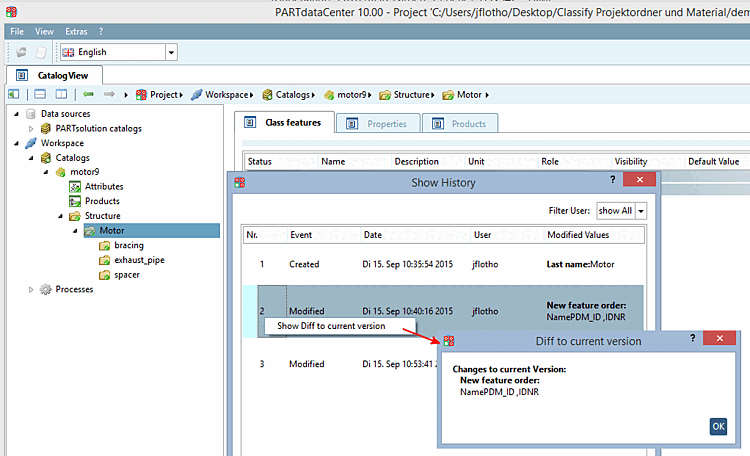
-> Si apre la finestra di dialogo Mostra cronologia [Show History].
Selezionare un evento. È possibile richiamare il comando del menu contestuale Mostra modifiche alla versione corrente [Show Diff to current version] sopra l'evento selezionato.[11]
Non appena viene selezionata una riga di evento e si fa clic su , viene ripristinato lo stato della versione selezionata.
Sezione 1.3.6.6.3, “Annullamento delle modifiche del comitato”Vedi anche .
[11] Solo per "Mostra cronologia [Show history]", non per "Cronologia prodotti per la sottodirectory [Show history of products in subtree]".