3.3.9.4.
Mappatura degli attributi in Solid Edge
3.3.9.4.1. Blocco [AttributeMapping(is3d)]
|  |
| Indietro | Avanti |
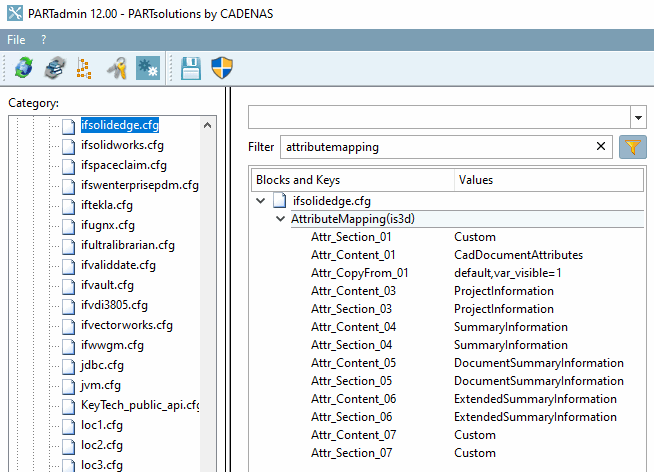
Nel blocco AttributeMapping(3D) si stabilisce se gli attributi standard di 3Dfindit devono essere trasferiti al sistema CAD e, in caso affermativo, in quale lingua/e.
Impostare la lingua desiderata in Attr_CopyFrom_01.
default: gli attributi di $CADENAS_LANGUAGE vengono trasferiti.
Specificare la lingua (tedesco, inglese, francese, ecc.): Gli attributi standard vengono trasferiti nella lingua specificata.
![[Nota]](https://webapi.partcommunity.com/service/help/latest/pages/it/partwarehouse/doc/images/note.png)
Nota Se non esiste una traduzione per un attributo nella lingua specificata, non viene trasferito non attributo (nemmeno quello della lingua $CADENAS_LANGUAGE).
Nessuna voce: non vengono trasferiti attributi standard. (Per trasferire esplicitamente alcuni attributi, consultare le informazioni nelle sezioni seguenti).
I valori possibili per le lingue sono:
default,tedesco,inglese,italiano,francese,spagnolo,portoghese,ceco,slovacco,ungherese,sloveno,olandese,danese,finlandese,russo,giapponese,coreano,cinese,polacco
I parametri "var_exclude" e "var_visbile=1" possono essere usati per copiare gli attributi.
"var_visible=1" a questo punto indica all'interfaccia che solo gli attributi visibili devono essere elaborati.
Si può usare "var_exclude" per assegnare certi attributi a un elenco "Ignora".
Le chiavi Attr_Content_01 e Attr_Section_01 rimangono invariate.
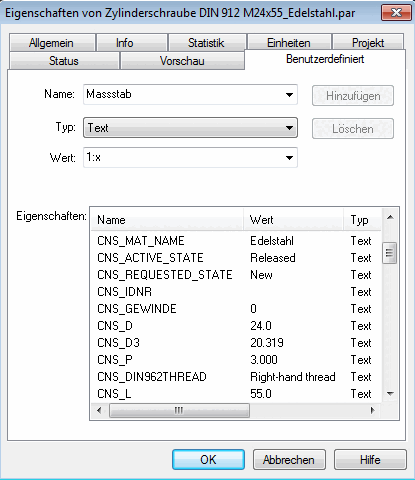
In Solid Edge, gli attributi sono visualizzati come attributi standard nella pagina Proprietà della parte-> scheda Definiti dall'utente.