

Vous trouverez ci-dessous une description de la manière dont vous pouvez remplacer des pièces individuelles (pièces normalisées, pièces achetées ou pièces internes) par des pièces alternatives de votre choix.
(Dans l'exemple suivant, seule la longueur d'une vis est modifiée).
Sélectionnez l'objet à remplacer (ou plusieurs) et cliquez sur Remplacer [Replace].
-> La boîte de dialogue d'interrogation Sélectionner le mode de remplacement [Select replacement mode] s'affiche.
Si le composant à remplacer fait partie d'un modèle, les possibilités de sélection sont légèrement différentes.
Remplacer les instances sélectionnées [Replace selected instances] (cas standard)
Toutes les instances du motif [All instances of the pattern] (les motifs sont reconnus. Dans un tel cas, cette option apparaît).
Remplacer toutes les instances [Replace all instances]
Tous les composants et assemblages d'un assemblage sont recherchés, vers le haut et vers le bas.
-> La boîte de dialogue Ouvrir un projet de composant ? [Open component project?] s'ouvre.
Wenn die Anzeige des Dialogs in Zukunft unterbleiben soll, aktivieren Sie Mémoriser ma sélection [Remember my choice].[16]
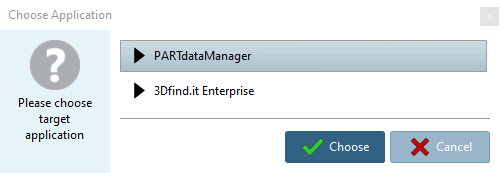
-> La boîte de dialogue Sélectionner une application [Choose Application] s'ouvre.
Cliquez sur le bouton correspondant.
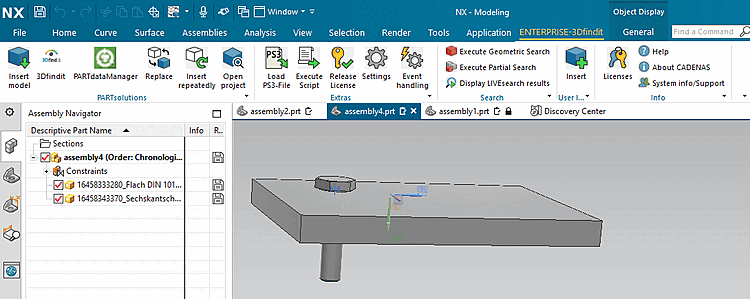
-> La vue retourne au système de CAO et le ou les composants sont immédiatement remplacés sans autre demande.
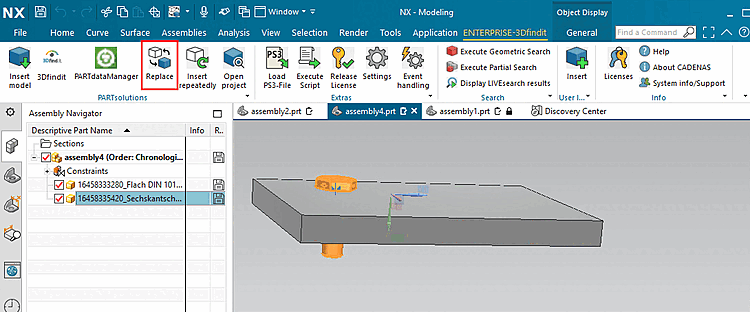
![Choisir le mode de remplacement [Select replacement mode]](https://webapi.partcommunity.com/service/help/latest/pages/fr/partsolutions_user/doc/resources/img/img_9d4a3fd37dff43a487254375abff2146.png)
![Choisir le mode de remplacement [Select replacement mode]](https://webapi.partcommunity.com/service/help/latest/pages/fr/partsolutions_user/doc/resources/img/img_356018845f9d4fc9a04b45ea92b92330.png)
![Ouvrir un projet de composant ? [Open component project?]](https://webapi.partcommunity.com/service/help/latest/pages/fr/partsolutions_user/doc/resources/img/img_96254e1cf40143629c3e57c34af934fc.png)
![[Remarque]](https://webapi.partcommunity.com/service/help/latest/pages/fr/partsolutions_user/doc/images/note.png)
![Bouton "Transférer vers CAO... [Transfer to CAD...]" dans PARTdataManager](https://webapi.partcommunity.com/service/help/latest/pages/fr/partsolutions_user/doc/resources/img/img_75ded5e6d33043a79a9d7afa298d9221.png)
[16] Dès que vous procédez à l'activation, une entrée correspondante est effectuée sous $CADENAS_USER/if<cadname>.cfg.
[Interface]
Replace_QueryOpenProject={0,1}
Replace_OpenProject={0,1}