
Capitolo 5. Gestione strategica delle parti
5.10. Visualizzazione della tabella in 3Dfindit e (PARTlinkManager)
|  |
| Indietro | Avanti |
- 5.10.1. Personalizzare i valori della tabella -> Personalizzare il testo / plinkcommon.cfg -> Blocco [MAPPING_<COLUMN_NAME>] - Chiave per il testo visibile
- 5.10.2. Regola i valori della tabella -> Regola il colore / plinkcommon.cfg -> Blocco [COLMAPPING_<nome variabile>] - Chiave COLORCODE<numero>
- 5.10.3. Regola i valori della tabella -> Regola testo e colore / plinkcommon.cfg -> Blocco [MAPPING_<nome_variabile>] -> Chiave per il testo visibile
- 5.10.4. Regola i valori della tabella -> Regola il colore con la condizione / plinkcommon.cfg -> Blocco [COLMAPPING_<nome colonna>] -> Chiave "COLORCOND<numero>"
- 5.10.5. Regolare i valori della tabella > Impostare la bitmap (solo PDataMgr) / plinkcommon.cfg -> Blocco [BMPMAPPING_<nome_colonna>] - Chiave "BMPCODE<numero>"
- 5.10.6. Regola i valori della tabella -> Imposta bitmap con condizione (solo PDataMgr) / plinkcommon.cfg -> Blocco [BMPMAPPING_<nome_colonna>] -> Chiave "BMPCOND<numero>"
- 5.10.7. Colori di sfondo per le colonne ERP/PDM / plinkcommon.cfg -> Blocco [GROUP_COLORS] -> Chiave GROUP<numero>
- 5.10.8. Determinare il colore della colonna in base all'indicatore nella colonna ERP (molto speciale) / plinkgroups.cfg -> Block [<Nome_Ruolo>] -> Key "COLORNUMBERTREE"
In questa sezione vengono fornite spiegazioni sulla visualizzazione delle tabelle in 3Dfindit / PARTdataManager e PARTlinkManager.[77]
![[Nota]](https://webapi.partcommunity.com/service/help/latest/pages/it/installation_ecatalogsolutions/doc/images/note.png) | Nota |
|---|---|
Tutte le impostazioni spiegate in questa sezione dipendono dal ruolo e hanno effetto su tutti i ruoli. | |
L'elenco seguente fornisce una panoramica:
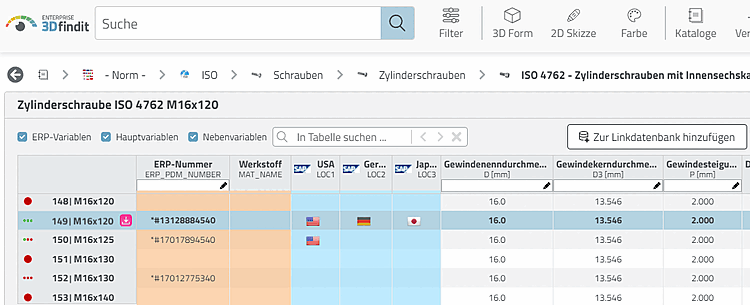
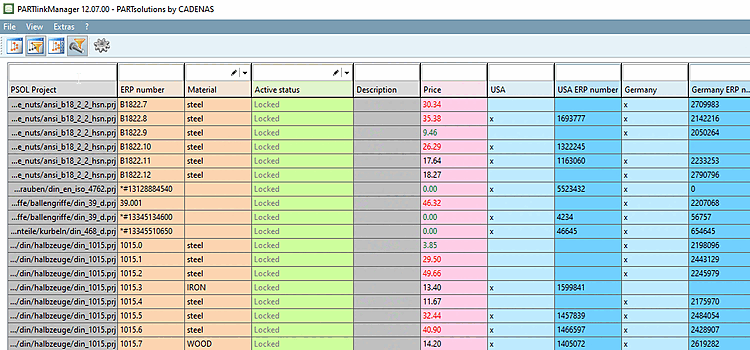
Per semplificare la selezione delle singole caratteristiche nella tabella (3Dfindit o PARTlinkManager ), è opportuno utilizzare colori, immagini e condizioni.
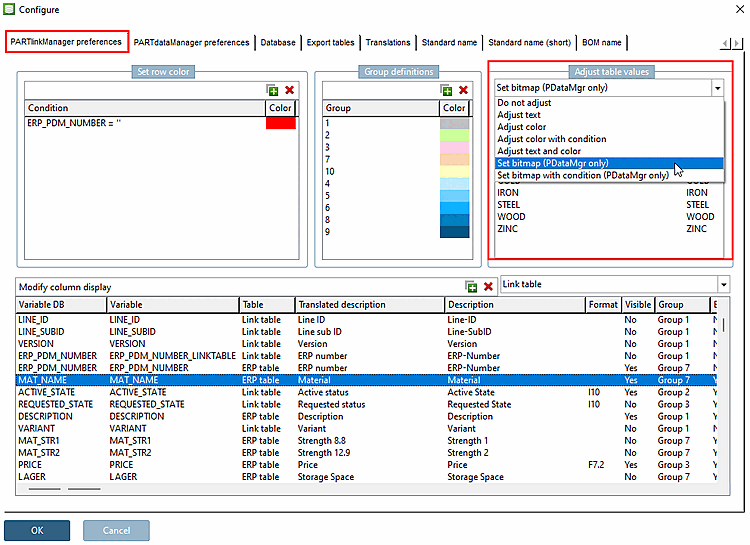
Le impostazioni si trovano in PARTlinkManager -> menu Extra [Extras] -> Configura ambiente ERP [Configure ERP environment] -> scheda Impostazioni PARTlinkManager [PARTlinkManager preferences] -> area Personalizza valori tabella [Adjust table values].
Le chiavi corrispondenti non fanno parte di una configurazione predefinita. Se si utilizza l'opzione di impostazione in Personalizza valori tabella [Adjust table values], questa azione crea blocchi e chiavi supplementari nel file di configurazione.
Personalizzare il testo [Adjust text]
Nel database PLDBDEMO si trova un esempio di questo nel blocco "MAPPING_ACTIVE_STATE".
Regolazione del colore [Adjust color]
Nel database PLDBDEMO si trova un esempio di questo nel blocco "MAPPING_ACTIVE_STATE".
Regolare il testo e il colore [Adjust text and color]
Nel database PLDBDEMO si trova un esempio di questo nel blocco "MAPPING_ACTIVE_STATE".
Regolare il colore con le condizioni [Adjust color with condition]
Nel database PLDBDEMO si trova un esempio di questo nel blocco "COLMAPPING_PRICE".
Imposta bitmap (solo PDataMgr) [Set bitmap (PDataMgr only)]
Nel database PLDBDEMO si trovano esempi di questo tipo nel blocco "BMPMAPPING_LOC1" o "BMPMAPPING_MAT_NAME".
Imposta bitmap con condizione (solo PDataMgr) [Set bitmap with condition (PDataMgr only)]
Nel database PLDBDEMO si trova un esempio di questo nel blocco "BMPMAPPING_PRICE1".
Colori di sfondo delle colonne (PARTdataManager e PARTlinkManager)
Per differenziare i diversi tipi di colonne ERP/PDM, è opportuno utilizzare colori di sfondo diversi. Vedere sopra.

[77] Una descrizione dettagliata del modulo 3Dfindit dal punto di vista dell'utente è disponibile all'indirizzo ENTERPRISE 3Dfindit - Utente in ENTERPRISE 3Dfindit - Utente.
Una descrizione dettagliata del modulo PARTdataManager dal punto di vista dell'utente si trova in Sezione 2.1, “ Gestore dei dati delle parti ” in PARTsolutions - Utente.