
5.10. Visualizzazione della tabella in 3Dfindit e (PARTlinkManager)
5.10.4.
Regola i valori della tabella -> Regola il colore con la condizione / plinkcommon.cfg -> Blocco [COLMAPPING_<nome colonna>] -> Chiave "COLORCOND<numero>"
|  |
| Indietro | Avanti |
Utilizzare l'opzione Regola colore con condizione [Adjust color with condition] per impostare una condizione per controllare il colore in base alla dimensione del valore.
L'impostazione si applica anche a 3Dfindit e PARTlinkManager.
Impostazione nel file di configurazione
$CADENAS_SETUP/plinkcommon.cfg:
Blocco [COLMAPPING_<nome variabile>], chiave COLORCOND<NUMERO>. Il primo valore contiene la condizione; utilizzare operatori logici come <, <=, >,>=, = . I seguenti valori rappresentano il colore nel codice RGB.
[COLMAPPING_PRICE]
COLORCOND0="PRICE>=20","255","0","0"
COLORCOND1="PRICE<20","0","128","64"
Impostazione nell'interfaccia utente in PARTlinkManager -> Menu Extra [Extras] -> Finestra di dialogo Configura [Configure] -> Pagina delle impostazioni di PARTlinkManager [PARTlinkManager preferences] -> Area di dialogo Regola valori tabella [Adjust table values] -> Regola colore con condizione [Adjust color with condition]
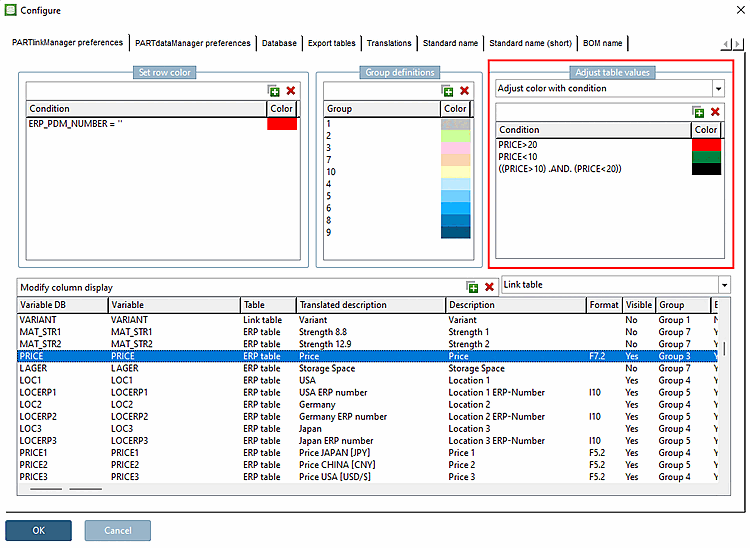
Esempio per la colonna "PREZZO":
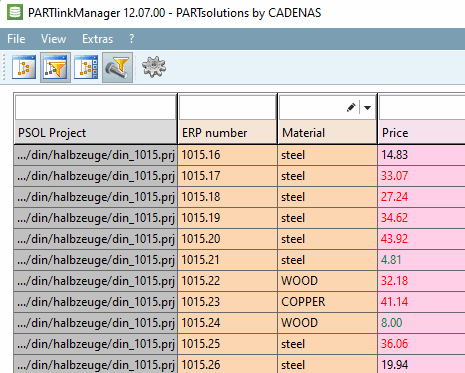
Visualizzazione in PARTlinkManager
![[Nota]](https://webapi.partcommunity.com/service/help/latest/pages/it/partsolutions_user/doc/images/note.png) | Nota |
|---|---|
I colori vengono visualizzati anche nel PARTdataManager. Il colore nero dei caratteri è sempre utilizzato in 3Dfindit. | |