

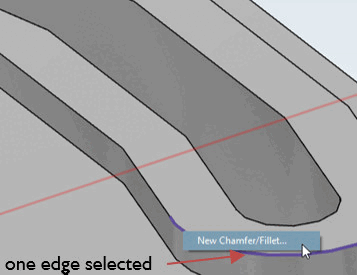
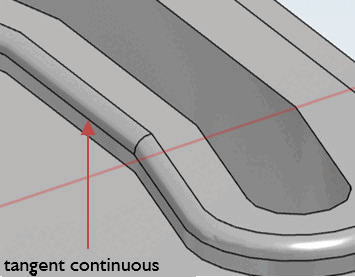
Se i bordi consecutivi sono collegati con un angolo < 15 gradi, è sufficiente selezionare un singolo bordo per applicare la funzione Crea nuovo smusso/arrotondamento. [New Chamfer/Fillet...].. a tutti i bordi successivi. anche a tutti gli spigoli successivi.
|
|
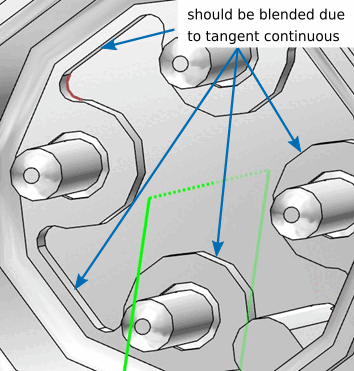
Figura 7.253. Applicazione automatica della continuazione tangenziale a tutti i bordi adiacenti corrispondenti
|
![[Nota]](https://webapi.partcommunity.com/service/help/latest/pages/it/partwarehouse/doc/images/note.png) | Nota |
|---|---|
Anche la continuazione tangenziale può causare miscele indesiderate. In questo caso, la fusione deve essere creata prima o utilizzando uno schizzo. | |
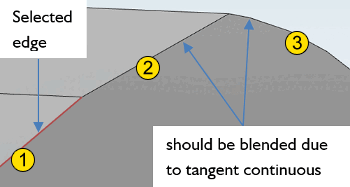
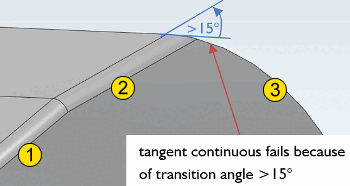
La continuazione tangenziale non si applica per angoli superiori a 15 gradi.
In
Nell'esempio riportato di seguito, il primo spigolo dopo il
 applicato la funzione di raccordo, ma la seconda
in base alla
applicato la funzione di raccordo, ma la seconda
in base alla  selezionata (cfr. figura al punto b), tuttavia, poiché
L'angolo di transizione è maggiore di 15 gradi.
selezionata (cfr. figura al punto b), tuttavia, poiché
L'angolo di transizione è maggiore di 15 gradi.
Le curve non vengono mai visualizzate in eCATALOG 3Dfindit. Le curve sono sempre suddivise in sezioni che hanno un certo angolo tra loro, quindi a bassa risoluzione l'angolo di transizione può essere superiore a 15 gradi.
Se una sezione è seguita da una curva e la continuazione tangenziale fallisce, il problema è sempre che la risoluzione è troppo bassa.
Tuttavia, se una sezione è seguita da un'altra sezione ad angolo ottuso e la continuazione tangenziale non funziona, il motivo è l'angolo superiore a 15° (vedi sopra ).

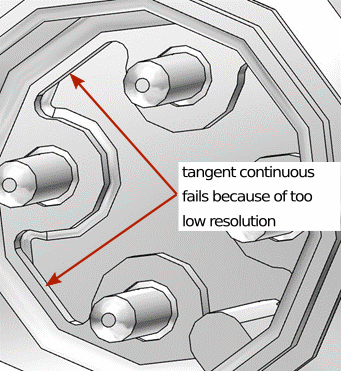
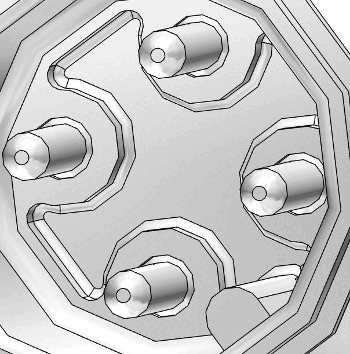
L'esempio seguente utilizza la selezione dei bordi. La continuazione tangenziale funziona per alcuni bordi, mentre per altri due bordi la continuazione tangenziale si interrompe a causa di una risoluzione insufficiente.
|
|
Figura 7.259. La figura mostra il fallimento della continuazione tangenziale a causa della risoluzione insufficiente.
|
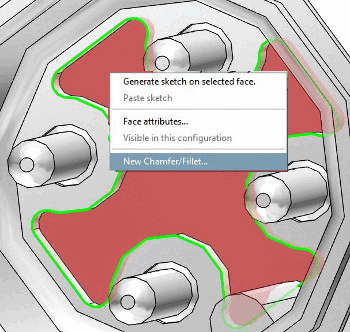
Le due illustrazioni seguenti mostrano l'uso della selezione dell'area.
|
|
Figura 7.261. La funzione di fusione viene applicata a tutti i bordi adiacenti alla superficie del pavimento.
|
| Nota |
|---|---|
| |