Capitolo 8.
PARTtemplateDesigner - Creazione di schede tecniche
8.2.
Aprire il modello di catalogo esistente
|  |
| Indietro | Avanti |
Sono disponibili diverse opzioni per aprire un modello già creato:
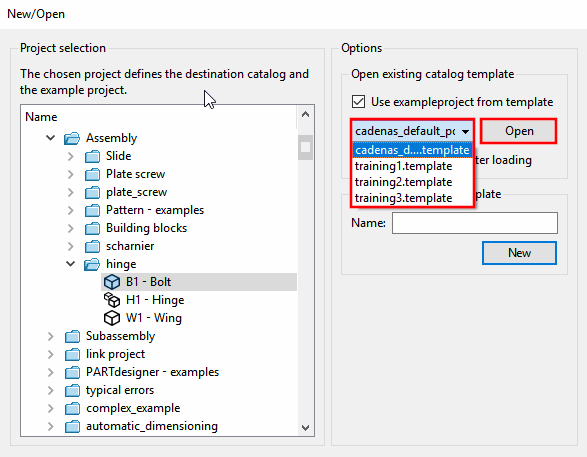
Selezione tramite il menu File [File] -> Nuovo [New] -> Nuovo/Apri [New/Open] finestra di dialogo -> Apri modello di catalogo esistente [Open existing catalog template] -> Selezione campo elenco -> :
(È necessario selezionare un progetto in Selezione progetto [Project selection] ).
In Aprire un modello di catalogo esistente [Open existing catalog template], selezionare il modello desiderato nel campo dell'elenco.
![[Nota]](https://webapi.partcommunity.com/service/help/latest/pages/it/partwarehouse/doc/images/note.png)
Nota Se la directory dei modelli esistente contiene anche vecchi file PDF[a] anche questi vengono visualizzati a titolo informativo, ma non possono essere selezionati.
[a] creati con versioni precedenti alla 9.04