

Mit Rechtsklick auf eine beliebige Toolbar öffnen Sie das Kontextmenü. Hier können Sie die einzelnen Toolbars ein- und ausblenden.
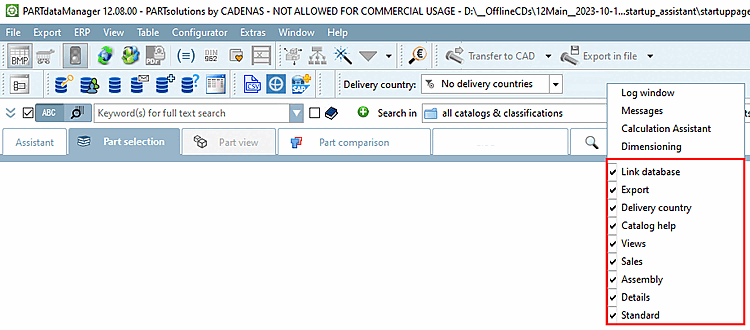
Linkdatenbank [Link database] (sofern ERP aktiviert ist)
Detaillierte Informationen hierzu finden Sie unter Abschnitt 2.1.11, „PARTdataManager – ERP/PDM Erweiterungen “.
Kataloghilfe [Catalog help] (Optional, falls vom Katalogersteller vorgesehen. Individuell gestaltbar)
![Ansichten [Views] Toolbar](https://webapi.partcommunity.com/service/help/latest/pages/de/installation_ecatalogsolutions/doc/resources/img/img_aa14bb626a9949c797355777d731474c.png)


![Montage [Assembly] Toolbar](https://webapi.partcommunity.com/service/help/latest/pages/de/installation_ecatalogsolutions/doc/resources/img/img_b07a4327a3c74e808e4f3b99bb831a7e.png)
![Linkdatenbank [Link database] Toolbar](https://webapi.partcommunity.com/service/help/latest/pages/de/installation_ecatalogsolutions/doc/resources/img/img_7963da66a4ce4ea6956ff40e9d7e2642.png)
![Kataloghilfe [Catalog help] Toolbar (beispielhaft für Festo-Katalog)](https://webapi.partcommunity.com/service/help/latest/pages/de/installation_ecatalogsolutions/doc/resources/img/img_a74a08bb59004a03b5761fa9ba16fefb.png)