 |
Values of text attributes can be translated.
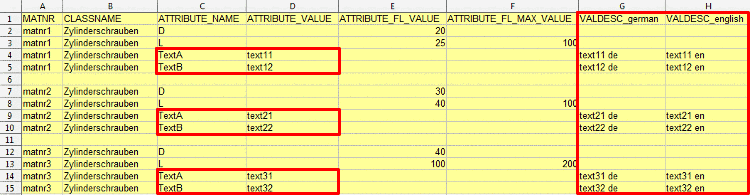
Create an own column for each desired language (here exemplified "VALDESC_german" and "VALDESC_english") and in the text attribute column insert the desired values (here exemplified "TextA" and "TextB").
Make sure that in the configuration file
classimport.cfgthe key "LANGUAGESFORVALUES" declares the desired languages[CLASSIMPORT] LANGUAGESFORVALUES=german,english
or that when calling up the "classimport.vbb" file the parameter "-languagesforvalues" is set.
%CADENAS%\bin\x86\32\cscripthost.exe
%cadenas_setup%\scripts\common\classimport.vbb
-mode new
-logfile c:\import\logfile.txt
-user erpuser
-pwd erpuser
–languagesforvalues german,english
In the
attributedef.txtfile for the desired text attributes, in the column "ATTRANSLATED" the value '1' has to be set.