5.9.2.12.2.1. Editing in the Json editor
To set End of Life phases, proceed as follows:
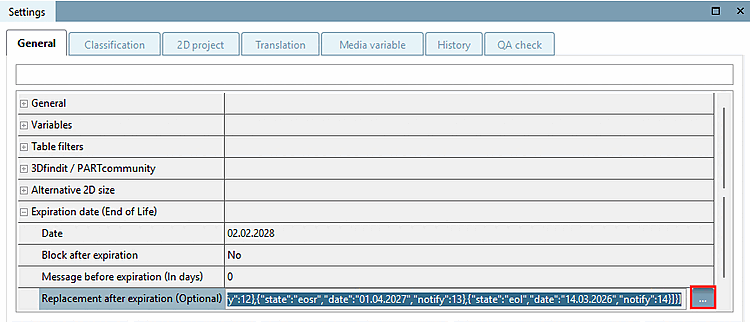
In the Replacement after expiry (optional) [Replacement after expiration (Optional)] line, click on the ... button.
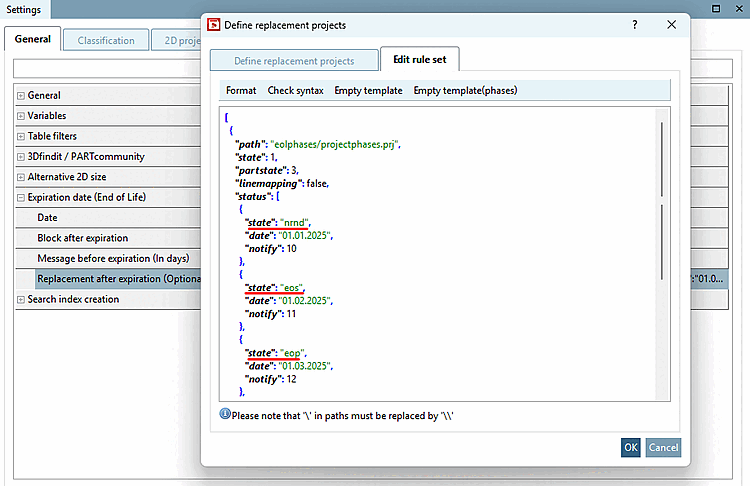
-> The Define replacement projects dialog box opens.
Select the Edit rules [Edit rule set] tab.
For example, select Empty template(phases) and edit the date ("date") and the lead time for a corresponding notification ("notify") for the individual statuses.
Further information:
state: internal value, do not change
partstate: controls the icons (which you can also select in the dialog)
0: Both parts are valid
1: Only new part is valid
2: Canceled without replacement, temporarily available
3: Deleted without replacement
4: Does not run out
linemapping: false|true
false: The defined phases refer to the entire project.
true (default, even if the entry does not occur in the JSON): It is interpreted on a line-by-line basis.