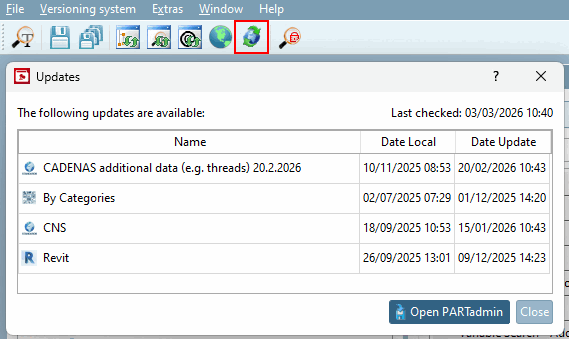
PARTproject checks whether there is an update for classifications and thread tables.
If an update is available, you can recognize this by the PARTproject symbol in the task bar as well as by the status message at the bottom right.
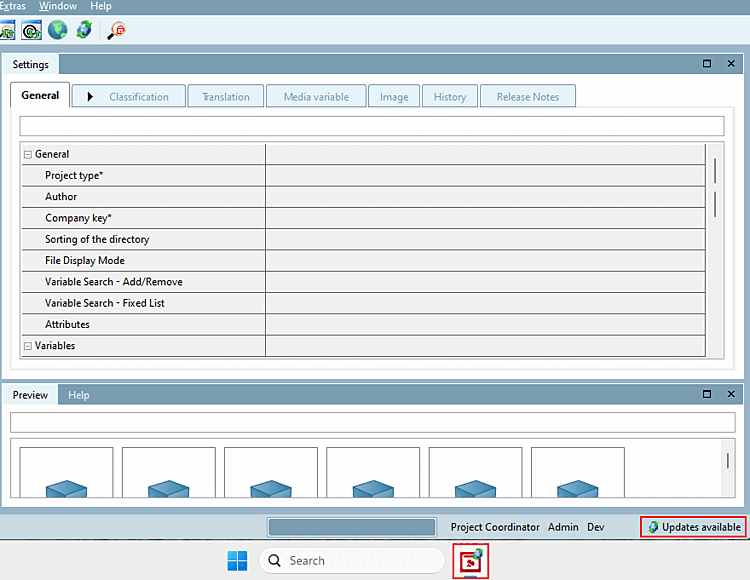
When PARTproject is started, the system waits the set interval to check for updates.
Click on Extras > Settings > Messages to configure the interval. If the display duration (s) [Display time (s)] is set to 0, no notification is displayed. If the notification is switched on, a notification that an update is available is displayed at the bottom right.
Click In the menu bar, click the
 On Updates for
Check classifications and thread tables to determine [Check for updates to classifications and thread tables] the
status.
On Updates for
Check classifications and thread tables to determine [Check for updates to classifications and thread tables] the
status.
If the required authorizations are available, you can install the updates directly via .
Test [Test directory] before executing the directory [Test directory]
The Updates dialog box is also displayed as a message before the Test directory is executed.
![News [Messages] setting](https://webapi.partcommunity.com/service/help/latest/pages/en/ecatalogsolutions/doc/resources/img/img_9d9646a982984a4bb1edb7d2b6363ec2.png)