
7.13. Docking window "Configurator " / "Assembly " 7.13.3. Create Assembly Table Project from A to Z
|  |
| Prev | Next |
The relationships are described below using an example:
![[Tip]](https://webapi.partcommunity.com/service/help/latest/pages/en/installation_ecatalogsolutions/doc/images/tip.png) | Tip |
|---|---|
In a standard installation, the file "training.cip" is located at $CADENAS/training". If you unzip this file, the example is available under "23dlibs/training/assembly/scharnier". | |
We create a hinge as an assembly table project from the components fluegel.prj and bolzen.prj. The assembly is carried out on the basis of connection points that have already been set.


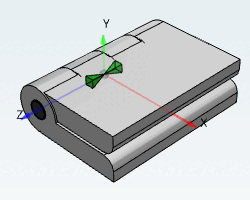
The angular position of the hinge is defined via a variable ("ANG") in a rule [Rule].
![[Note]](https://webapi.partcommunity.com/service/help/latest/pages/en/installation_ecatalogsolutions/doc/images/note.png) | Note |
|---|---|
An Assembly Table Project is basically created through an assembly configuration and an assembly template. | |
