
2.1.11. PARTdataManager
– ERP/PDM extensions
2.1.11.7.
Status bitmaps for table (traffic light circuit)
|  |
| Prev | Next |
Preferred parts can be tagged in many ways. Not only red-green display is possible, in fact any color or icon can be used.
The status bitmaps can signal an export restriction [Export restriction] or only have a hint function.

Parts for which the status light is set to green may be exported to the CAD system. Parts for which the status light is set to red may not be exported to the CAD system.
A detailed description of how the rules are defined can be found under Section 5.7.5.1.2, “ Preferred series - plinkgroups.cfg -> Block [Role_name] -> Key "PREFRANGE" ” in ENTERPRISE 3Dfindit (Professional) - Administration
The standard red/green display can be enhanced, so that any amount of colors (icons) can be displayed.
In any case, parts should then be used preferentially in accordance with the label.
A sensible rule could be, for example:
Dunkelgrün =  Bereits verwendet an allen Standorten
Mittelgrün =  Bereits verwendet an zwei Standorten
Hellgrün =    Bereits verwendet an einem Standort
Gelb =        An keinem Standort verwendet, aber mit ERP-Nummer
Rot =         Entspricht keiner Vorgabe
A color could be defined which signalizes whether a part is in stock. Each rule which can be deduced from table or project information is possible!

When moving your mouse over the status icon position (if highlighted), a tooltip shows up.
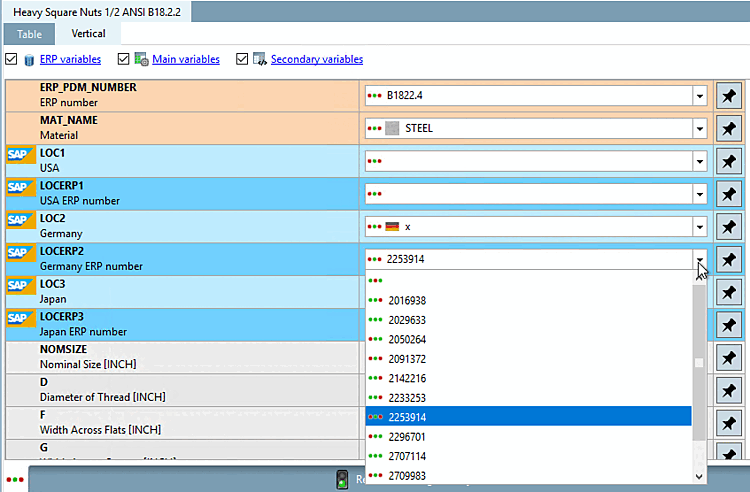
The status bitmaps are also displayed in the Vertical view type in the list field of each variable.
A detailed description of how the rules are defined can be found under Section 5.7.5.1.2, “ Preferred series - plinkgroups.cfg -> Block [Role_name] -> Key "PREFRANGE" ” in ENTERPRISE 3Dfindit (Professional) - Administration