
 |
The user interface has been completely revised.
Within a class system you can transfer the class information to another class system via mapping. For example: In this way you can map your own class system to an already existing or you can classify a catalog according to eClass 6.0, which is already classified according eClass 5.1 with little effort.
A wizzards leads through all setting options.
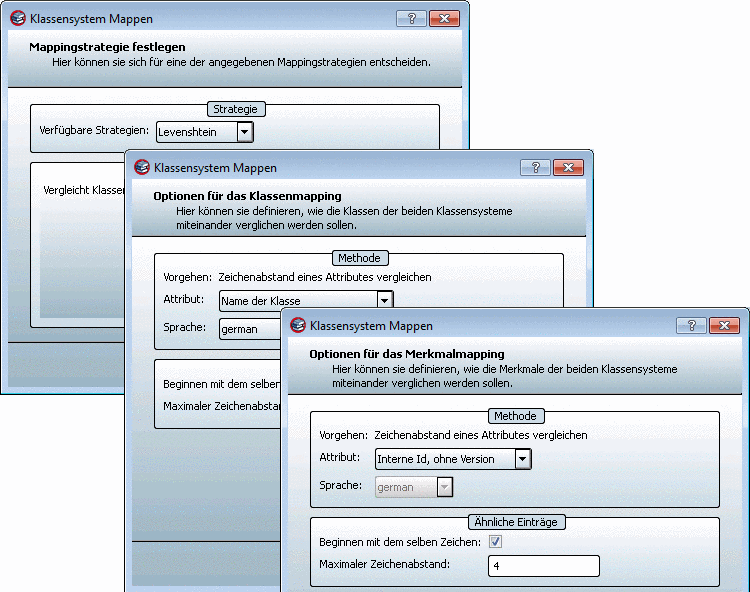
When all settings have been set in the wizzard and the mapping has been created, then it is displayed in the pproject dialog box (see following figure).

On the left side the available class systems are displayed. Below each node class systems, which already have been mapped, are displayed in black color and class systems, which can still be mapped, are displayd in grey color.
On the right side you can see the assignment of elements (separated after class and attributes).
The font colors have the following meaning:

| Entries without proposals |

| Entries with available proposals |

| Entries with defined mapping |

| Entries with defined multi mapping |
The manual editing of not defined mapping entries is performed via context menu commands.

As of v9 you can search for entries in an already existing mapping, for example in order to limit or expand parameters or in order to perform a new search with changed search strategy.

A wizzard guides through the available strategies. Presently the Levenshtein algorithm is available, which is performing a similarity search on string base. With this names, descriptions, IDs, etc. of the items can be compared. Furthermore special mapping files can be analyzed for eClass mappings.
Add projects to classification
In order to implement a mapping, the mapping has to be assigned to the desired classification. In PARTproject on the desired directory level click on the context menu command Automation -> Add projects to classification. Only by this step the projects are connected with the new, mapped class system.
The Set classification dialog box opens.
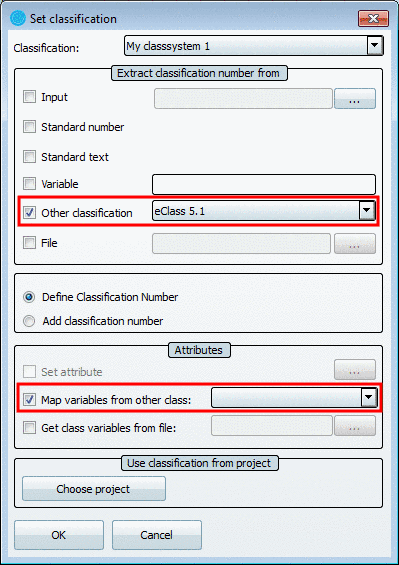
With the Other classification and Map variables from other class options the classes and attributes of the mapped classification are overtaken and connected with the desired projects.