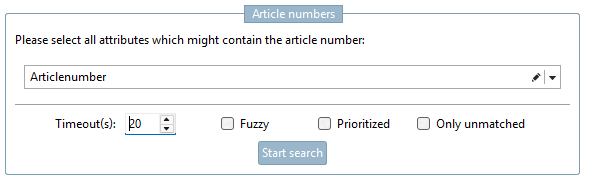
The goal is to assign a specific item number from a PSOL catalog to each line in the table
Select attributes that might contain the item number (no exact match required; "contains" is sufficient)
Select one or more attributes that might contain the product's SKU. The attribute does not have to exactly match the SKU in the target catalog. It is sufficient if the attribute string contains the SKU anywhere.
There are several options for configuring the search:
Timeout: Maximum time per search operation. This ensures that the search does not get stuck on a specific item. If the search operation remains within the specified time limit, the search proceeds to the next item .
Fuzzy: Fuzzy search. Greater tolerance for discrepancies between the search term and the search result (e.g., transposed letters)
Enabled: Sequential search, starting with the catalogs with the highest probability of a match.
Example: If catalog "A" has a trust score of 90 and catalog "B" has a trust score of 80, then the search term from Catalog "A" is used first, and then (if there was no match there) the one from Catalog "B".
Disabled: All catalogs found for the row are used simultaneously. Using this option may reduce search performance .
"Only unmatched": When enabled, only the rows with no matches are considered for the next search.
It is possible to select rows in the preview so that the search is performed only on the selected rows instead of on all of them.
Click the " button to run the search. Depending on the number of products, this may take some time. The progress is displayed during the search.
Explanation of the columns in the preview table:
PSOL catalogs [PSOL catalogs]: List of catalogs in which to search for item numbers (specified in the previous tab).
Item number (CSV) [Article number (CSV)]: Search string for the selected attributes that should contain the item number
PSOL Result [PSOL Result]: Contains the catalog and part number of the search result (if available). Use the PARTdataManager icon to open the result in PARTdataManager.
Quality: Estimated quality of the search result (the higher, the better). An exact match (reverse lookup) results in a quality score of 100 %.
Search type [Search type]: The search type that led to the search result (Reverse Lookup, Subsearch, Fuzzy Subsearch)
Info: May contain additional information about the search result, e.g., "Catalog with low confidence (60)." This means that the catalog to which the product was assigned has a low confidence score (60 in this case). Therefore, it is recommended that you carefully review the result to avoid false positives. .
Keep: Checkboxes for specifying which products should be included in the next tab. These are automatically preselected based on the search results. The user can manually select or deselect items.