

The automatic check for software updates can be activated or deactivated under Tools menu [Extras] → Settings... → Update notification > Activate automatic update notification on or off (activated by default).
!["Activate automatic update notification [Activate automatic update notification] " option](https://webapi.partcommunity.com/service/help/latest/pages/en/partsolutions_user/doc/resources/img/img_0378e7c82e9d425284bf5bffadec9934.png)
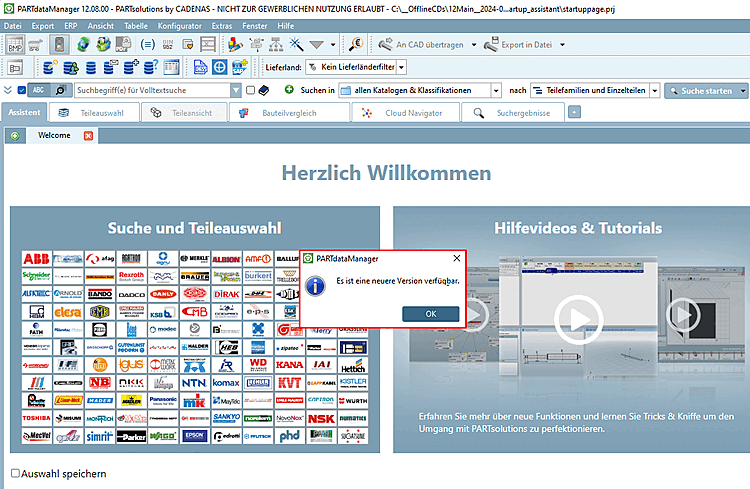
Enterprise 3Dfindit (Professional) and eCATALOG 3Dfindit customers are informed about new releases by means of update notifications [Update notification]:
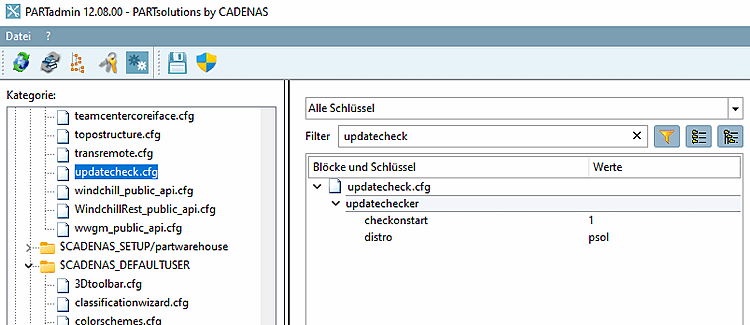
The setting is saved under $CADENAS_USERin the configuration file updatecheck.cfg, block updatechekcer, key checkonstart.
In the Help menu [Help] → menu item Check for update... menu item, you can perform a manual check at any time.
![Check for update [Check for update...]..](https://webapi.partcommunity.com/service/help/latest/pages/en/partsolutions_user/doc/resources/img/img_00d64f4d5f0c485c958d201c2e0b7be0.png)
→ A corresponding message then appears.
![Example: "There is no newer version available [There is no new version available.]."](https://webapi.partcommunity.com/service/help/latest/pages/en/partsolutions_user/doc/resources/img/img_98e5344fa4fa4dd6b65ace10afaa0463.png)