

During a test meta run, you can display the Find unused files setting in the QA Check settings [QA Check Settings] dialog box. This lists the unused files as a warning during the check. Once the test is complete, you can decide whether you want to delete the files or export a CSV.
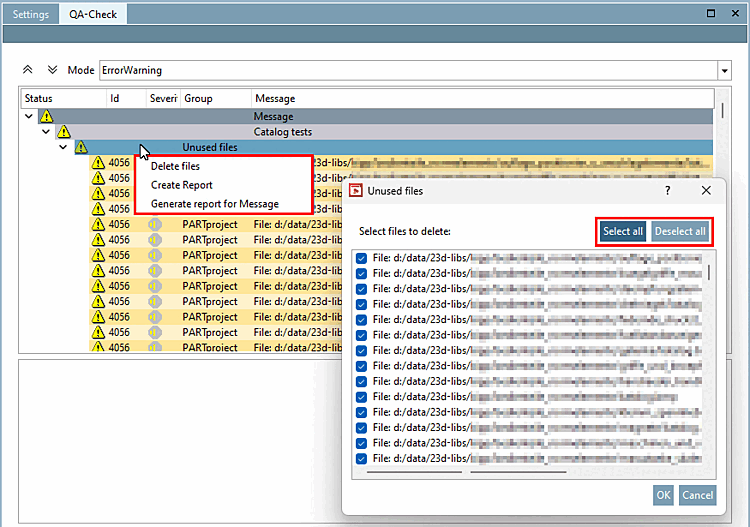
In the selection dialog for deleting, the two buttons Select all and Deselect all have been added (see figure below).
In the settings dialog of a test meta run, select Find unused files to output the listing.
![Catalog / Project > Right-click > Test directory > QA Check settings [QA Check Settings] > Find unused files](https://webapi.partcommunity.com/service/help/latest/pages/en/partsolutions_user/doc/resources/img/img_f054f4399aa641d8ab7712e6c789b18d.png)
Catalog / Project > Right-click > Test directory > QA Check settings [QA Check Settings] > Find unused files
Once the test run is complete, you can right-click on the Unused files line and click Delete files in the context menu. The Unused files dialog box opens. Previously, you could only click on the files manually. Now you can select or deselect all files using the two buttons.
You can find more information on this in the Section 6.7, “ QA-Check register page ” in eCATALOG 3Dfindit Tabbed page chapter.