
1.7.5. $CADENAS_SETUP
1.7.5.21.
topostructure.cfg - PARTdataManager / 3Dfindit: GeoDb topology search
|  |
| Prev | Next |
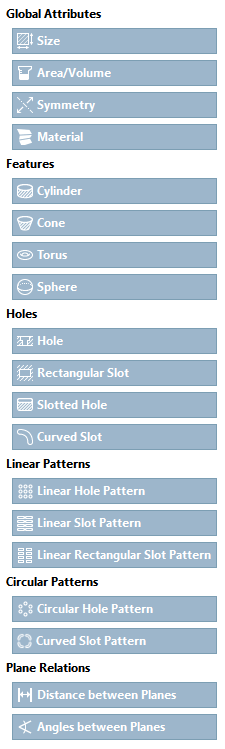
The search options for the GeoDb
topology search [Topology search] are defined in the configuration file topostructure.cfg. The search categories and which features / global attribute groups are to be displayed in the topo search dialog are defined. It is also defined which attributes of the respective features / global attribute groups can be searched for. Additional information (display name, help text ID, icons, etc.) can be specified for all such config blocks.
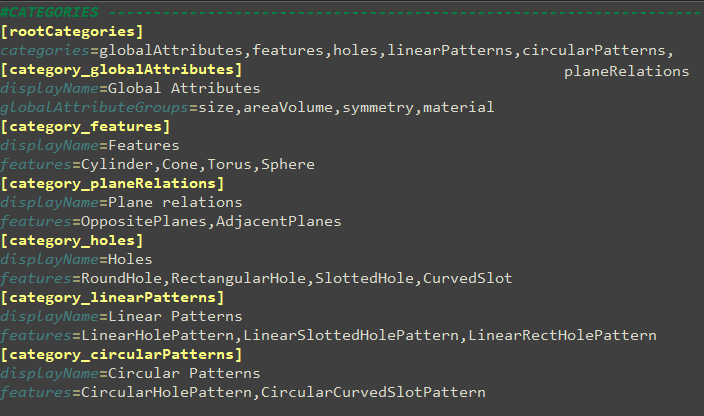
The following explains how to determine search categories in the config and how these settings are presented in the topology search dialog. Categories are described as separate config blocks, e.g. [category_features]. The prefix "category_" is mandatory. It is followed by the internal name of the category, e.g. "features" (can be chosen freely). Using this internal name the respective category can be referenced in the block [rootCategories] under "categories". The categories are displayed in this order in the topo search dialog.
The listed features and global attribute groups (globalAttributeGroups) within the categories are specified in detail in other blocks of the config (e.g. [feature_Cylinder] or [globalAttributeGroup_symmetry]). Both global attribute groups and features can be added to a category.
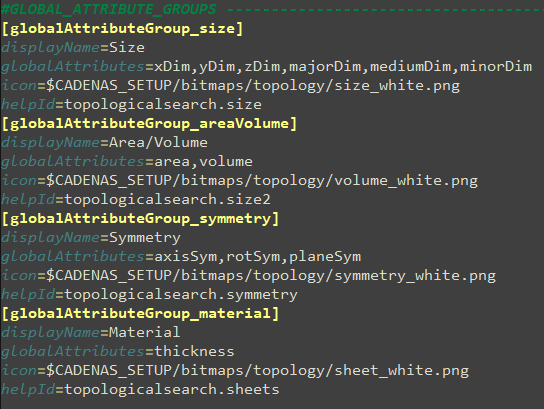
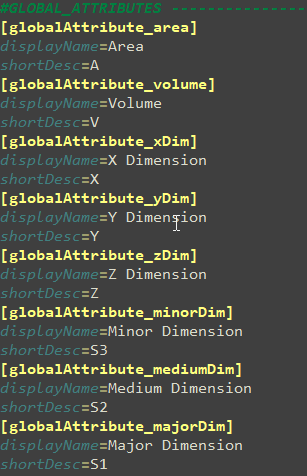
Global attribute groups can be freely defined. The global attributes to be displayed and their sequence are defined under "globalAttributes". The global attributes, on the other hand, are limited to a specific selection.
Global attributes: xDim, yDim, zDim, minorDim, mediumDim, majorDim, area, volume, thickness, axisSym, planeSym, shape.
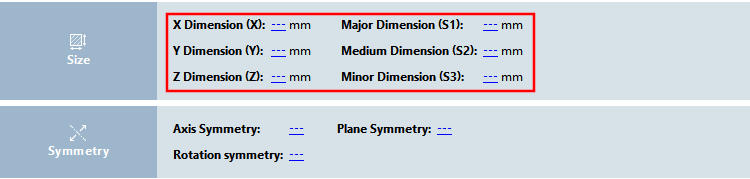
Example for global attribute group "size": xDim, yDim, zDim, minorDim, mediumDim, majorDim
Additionally, the global attributes can be enriched with extra information within separate config blocks (globalAttribute_) in order to determine the display name (displayName) and the short description (shortDesc).
Features and their attributes are also restricted for selection just like the global attributes.
Cone: aperture, truncatedLength, frustumLength, area, orientation, sweepAngle, majorDiameter, minorDiameter
Sphere: area, orientation, latitudinalAngle, longitudinalAngle, diameter
Torus: area, orientation, latitudinalAngle, longitudinalAngle, minorDiameter, majorDiameter
Hole: depth, diameter, holeType, counterTypeStart, counterTypeEnd
LinearHolePattern: holeCount, width, height, distanceX, distanceY, alignment
LinearSlottedHolePattern: holeCount, width, height, distanceX, distanceY, alignment
LinearRectHolePattern: holeCount, width, height, distanceX, distanceY, alignment
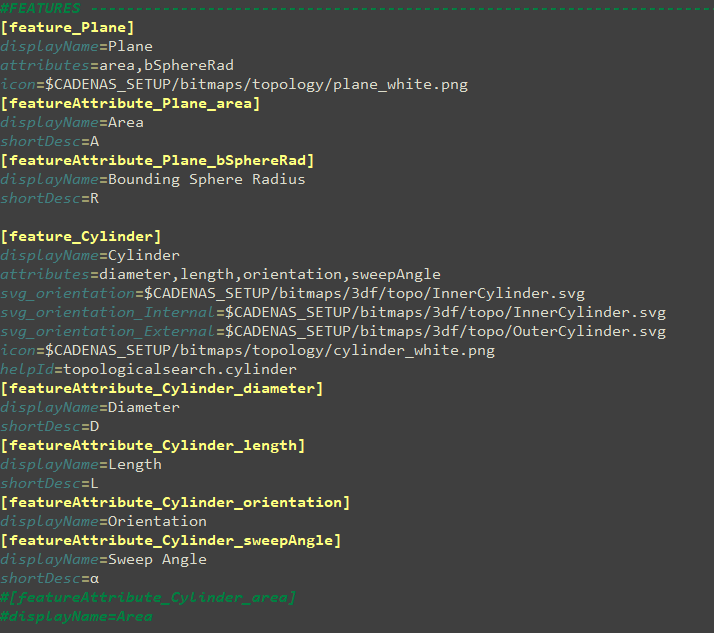

In the config blocks of the features, the order of the attributes to be displayed is defined in the "attributes " key. If this key is omitted, all attributes of the feature are used in the internal order by default. The attributes of the features can be expanded in the same way as the global attributes. In the config blocks of feature attributes, the prefix "featureAttribute_" is followed by the name of the feature (e.g. "Cylinder_") and then the name of the attribute (e.g. "diameter").
There is also the option to define derived features (derivedFeature_) in the config in order to combine, to map or to restrict certain attributes to a fixed value. However, here the syntax is very complicated and changes should only be made by developers.
These settings can be used to specify the facets that you want to be displayed. This is the default configuration:
[settings]
TopoFacets=MinorDim,MediumDim,MajorDim,Thickness
For each value from this list, there is a block below it that configures the respective facet. Here is an example:
[TopoFacet_MinorDim]
attributeGroup=Part
attribute=MinorDim
DisplayName=Minor Dimension
MaxDistinctValues=10
DecimalPlaces=2
IconPath=$CADENAS_SETUP/bitmaps/topology/X.png
DefaultUnit=mm
MinValue=0
MaxValue=100000
By default,
The following facets are available: Smallest dimension, Medium dimension, Largest
Dimensions and material thickness. All other facets are possible, but must be
must first be configured. To create a facet, the values
"displayName", "attributeGroup" and "attribute" are mandatory, all other
Information is optional. "attributeGroup" and "attribute" refer to
each to the global attribute groups and features as well as their attributes
in "topostructure.cfg". Inferred Features
are currently not supported and therefore cannot be used
become.