

Click on the context menu command Create assembly table project to open the Create assembly table dialog box.
![Context menu command "Create assembly table project [Create assembly table project]"](https://webapi.partcommunity.com/service/help/latest/pages/en/partsolutions_user/doc/resources/img/img_23c1f95765264c45829f4cbc9467d883.png)
For file and path selection, a Browse button is now available in the File name field is now available.
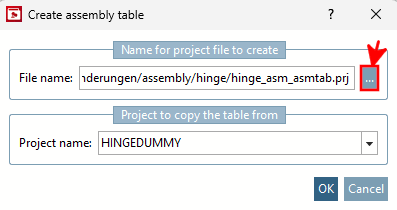
So far, the
Assembly table project only in the same
directory as the stencil ( .asmsbl
or .asmtpl ). With the new feature,
Now also a location in a completely different directory
determine.
Further information on this can be found in the chapter Section 7.13.3, “Create Assembly Table Project from A to Z ” in eCATALOG 3Dfindit.