

- 5.9.1. Overview on tabbed pages
- 5.9.2. Tabbed page: General
- 5.9.2.1. Menu item: General
- 5.9.2.1.1. Project type
- 5.9.2.1.2. Author
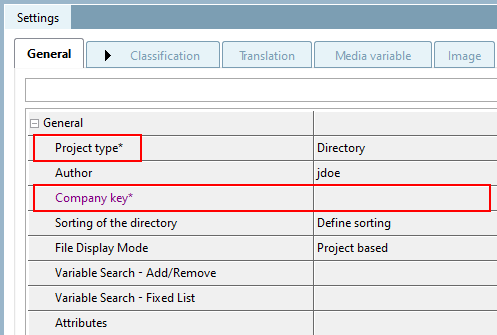
- 5.9.2.1.3. Company key
- 5.9.2.1.4. Directory sorting
- 5.9.2.1.5. File display mode
- 5.9.2.1.6. Variable search - Add/Remove / Variable search - Fixed list
- 5.9.2.1.7. Short description (max. 16 characters)
- 5.9.2.1.8. Line description
- 5.9.2.1.9. Similar to Norm (optional)
- 5.9.2.1.10. Table file
- 5.9.2.1.11. Preview
- 5.9.2.1.12. Product information pages
- 5.9.2.1.13. Additional export formats
- 5.9.2.1.14. Additional data tables
- 5.9.2.1.15. Coordinate axes
- 5.9.2.1.16. Attributes
- 5.9.2.1.17. Special case
- 5.9.2.1.18. Determination of search variables
- 5.9.2.2. Menu item: Assistant
- 5.9.2.3. Menu item: Variables
- 5.9.2.4. Menu item: Catalog settings (display at catalog level)
- 5.9.2.5. Menu item: Table filter
- 5.9.2.6. Menu item: 3Dfindit / PARTcommunity
- 5.9.2.7. Menu item: Color
- 5.9.2.8. Menu item: Render properties
- 5.9.2.9. Menu item: Alternative 2D size
- 5.9.2.10. Menu item: Dimensioning
- 5.9.2.11. Menu item: Link (Display for link projects)
- 5.9.2.12. Menu item: Expiry date (End of Life)
- 5.9.3. Tabbed page: Classification
- 5.9.4. Tabbed page: Views
- 5.9.5. Tabbed page: 2D project
- 5.9.6. Tabbed page: Bitmaps
- 5.9.7. Tabbed page: Rolling bearings
- 5.9.8. Tabbed page: Assembly
- 5.9.9. Tabbed page: Variable assignment (project type "Assembly table")
- 5.9.10. Tabbed page: Accessories
- 5.9.11. Tabbed page: Translation
- 5.9.12. Tabbed page: Picture
- 5.9.13. Tabbed page: Database
- 5.9.14. Tabbed page: Image file
- 5.9.15. Tabbed page: Table file
- 5.9.16. Tabbed page: Document
- 5.9.17. Tabbed page: Media Variable
- 5.9.18. Tabbed page: History
- 5.9.19. Tabbed page: QA-Check
- 5.9.20. Tabbed page: Catalog spl itting
- 5.9.21. Tabbed page: Release notes
- 5.9.22. Keys in catalog directories and subdirectories
- 5.9.23. Configuration Files
You have created directories, project files and their sub-files (*.pra, *.3db, etc.) in the Project selection dialog area.
You can make special settings for these on the subpages of the Settings tab.
In the following sections, the single subpages and fields are described in detail:
!["Settings [Settings] " dialog area](https://webapi.partcommunity.com/service/help/latest/pages/en/partwarehouse/doc/resources/img/img_0f1e73c950334fdd97d7be7f8b76f0a1.png)
![[Note]](https://webapi.partcommunity.com/service/help/latest/pages/en/partwarehouse/doc/images/note.png) | Note |
|---|---|
The tabs can be arranged via Drag & Drop as desired. The position is saved via config entry, so that the last arrangement is shown when opening again.
| |

![$CADENAS_DEFAULTUSER > pproject.cfg > Block [MANDATORYFORTESTMETA]](https://webapi.partcommunity.com/service/help/latest/pages/en/partwarehouse/doc/resources/img/img_1a55dfc0ea704a899e9f4033667c207f.png)