
 |
As of v9.04 the keyword search has been considerably enhanced.
Now you can combine Keyword search and Variables search directly in the input field of the keyword search.
hexagon bolt L >= 120 AND L < 160 AND D = 22
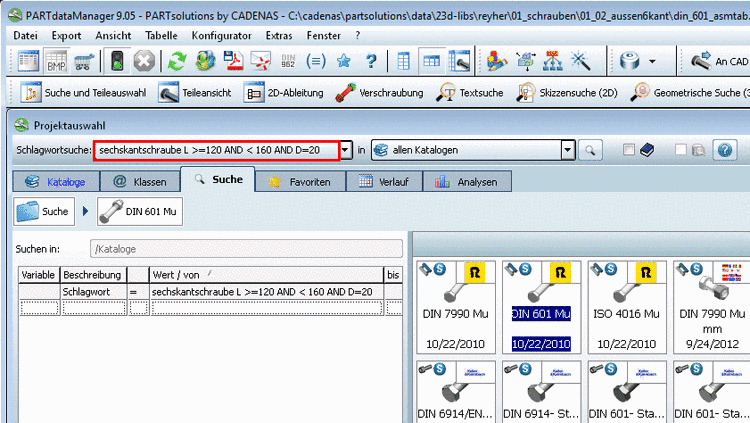
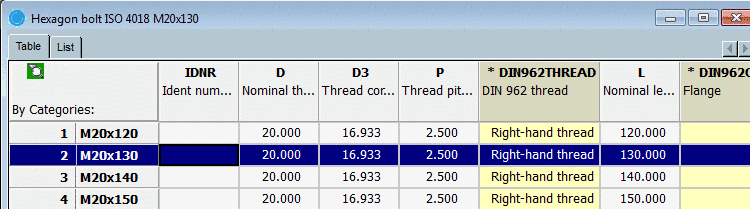
Result: In the
Part view table only lines according to the
search are displayed. The table restriction is signalized via a filter icon
 . With click on the icon the table restriction is
canceled and all lines are displayed now.
. With click on the icon the table restriction is
canceled and all lines are displayed now.
In the following you will find an overview of the various search options and the respective syntax in the input field.
A term query is the actual basis for all queries. Each term/word has to appear anywhere in the project. The sequence is not important.
bolt shank
A NOT operator can be used in order to exclude certain terms from the results. Different spelling can be used for this method.
Bolt NOT reduced shank
Bolt !reduced shank
With the OR operator the search can be expanded to several terms. At least one of the terms has to apply.
Hexagon bolt OR Head cap bolt
Term query with AND Operator (Default!)
All terms connected by the AND operator have to be part of the result. This kind of query leads to the same result when no operator is used.
bolt AND shank
bolt shank
Term query with defined sequence (phrase) => "xyz"
Using quotation marks (") you can determine that the contained terms have to occur in the given sequence. A "query with phrase" is automatically generated when a term contains special characters or terms which are composed by characters and numbers.
"Hexagon bolt with shank"
AB1-455-PDA => "AB 1 455 PDA"
Prefix query (Term query with a wildcard at the end) => *
Note: The wildcard sign may only occur at the end of a term or a number!
Note: Adding a wildcard to a term affects the performance (negative)!
Bolt*
Wildcard query - Terms with a placeholder - ?
The placeholder can only be used for order numbers. ? is for any single sign instead of the placeholder. Using several placeholders in a row at any position is possible.
ABC-5?6
You can search for certain variables directly in the table. With numbers mm is supposed.
Connect the variable name with certain values by using mathematical operators.
You can find a detailed description under Teileauswahl per Schlagwortsuche.