1.5.4.3.
Licenses " tab page (license server)
1.5.4.3.2.
Check licenses ... (License server)
|  |
| Prev | Next |
The License server entry is selected under Category.
-> The setting pages for the license server administration are displayed.
The Licenses tab page is selected by default.
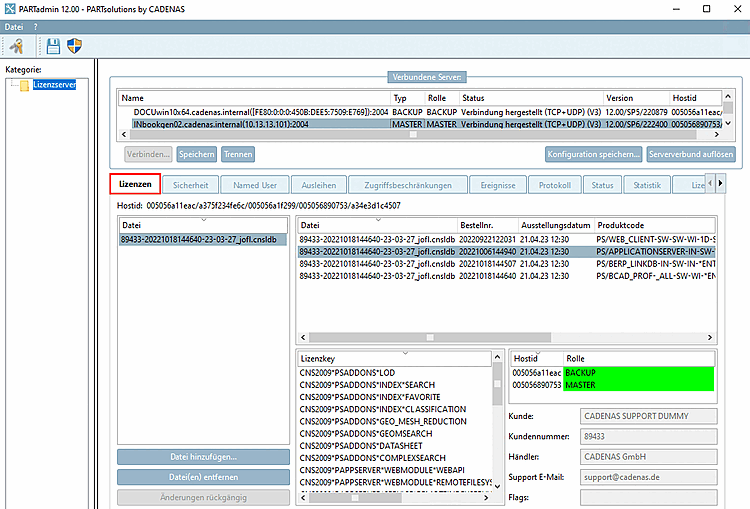
On this page you can check all data of your server licenses, especially the status [Status], which should be green = Ok.
All valid hostids [Host ID] are displayed directly below the tabs. These were determined automatically.
As soon as a file is selected (see figure above), the information is also displayed in the License key and Hostid/Role [Role] dialog areas.
The tab page corresponds to the one already described under License management [License administration] -> Licenses tab page. Details can be found there.
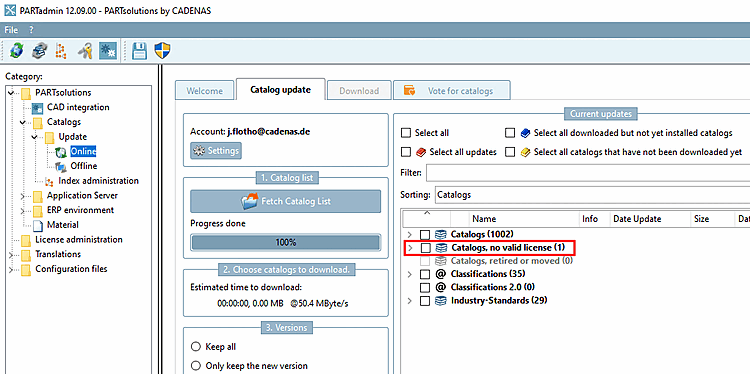
Catalogs without a valid license are displayed under PARTadmin -> PARTsolutions -> Catalogs -> Update > Online in a separate category Catalogs, no valid license.