1.3.4.11.3.
Ricerca topologica - impostazioni in dettaglio
1.3.4.11.3.14.
Schema di scanalatura lineare
|  |
| Indietro | Avanti |
Utilizza questa funzione per cercare modelli di fessure lineari.
![a) Numero di larghezze [Amount Width] (qui 6 elementi come esempio), b) Numero di altezze [Amount Height] (qui 4 elementi come esempio), c) Lunghezza del foro [Hole Length], d) Larghezza del foro [Hole Width]](https://webapi.partcommunity.com/service/help/latest/pages/it/partsolutions_admin/doc/resources/img/img_3b56b099f4e24886938da43a57289fe3.png)
Figura 1.371. a) Numero di larghezze [Amount Width] (qui 6 elementi come esempio), b) Numero di altezze [Amount Height] (qui 4 elementi come esempio), c) Lunghezza del foro [Hole Length], d) Larghezza del foro [Hole Width]
![[Nota]](https://webapi.partcommunity.com/service/help/latest/pages/it/partsolutions_admin/doc/images/note.png)
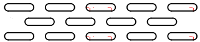
![Disposizione [Arrangement]: Dritto [Straight]](https://webapi.partcommunity.com/service/help/latest/pages/it/partsolutions_admin/doc/resources/img/img_a891e290d54043c9b41ab9f60bf67400.png)