1.4.3.6.
Indexverwaltung
1.4.3.6.3. Benutzeroberfläche der Indexverwaltung im Überblick |  |
| Zurück | Weiter |
Die folgende Abb. zeigt die Benutzeroberfläche von PARTadmin.
![PARTadmin -> Kategorie [Category]: Indexverwaltung [Index administration]](https://webapi.partcommunity.com/service/help/latest/pages/de/installation_ecatalogsolutions/doc/resources/img/img_09a5c490bb944eb3849ea76bf883396d.png)
Die Benutzeroberfläche von PARTadmin mit Auswahl Indexverwaltung [Index administration] gliedert sich in folgende Bereiche:

| Menü [Menu] und Symbolleiste |

|
Alle Verwaltungsoperationen werden innerhalb von PARTadmin ausgeführt. Über Kategorie [Category] wählen Sie den speziellen Anwendungsfall (z.B. Indexverwaltung [Index administration], Katalogaktualisierung [Catalog update], ERP-Umgebung [ERP environment], etc.) Im vorliegenden Abschnitt geht es um die Indexverwaltung [Index administration].
|

|
Inhaltsseite der gewählten Kategorie Indexverwaltung [Index administration]
|

|
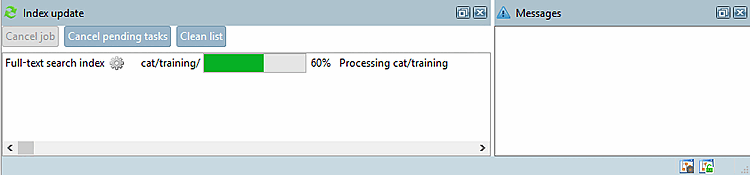
Fortschrittsanzeige der Indexaktualisierung [Index update]
|

| |

|
|
![[Hinweis]](https://webapi.partcommunity.com/service/help/latest/pages/de/installation_ecatalogsolutions/doc/images/note.png)
![Dialogbereich "Indexaktualisierung [Index update]" aktivieren](https://webapi.partcommunity.com/service/help/latest/pages/de/installation_ecatalogsolutions/doc/resources/img/img_3b4c888fbb24403ba538a7630af3f2cc.png)
![Dialogbereich "Indexaktualisierung [Index update]"](https://webapi.partcommunity.com/service/help/latest/pages/de/installation_ecatalogsolutions/doc/resources/img/img_c423a0c4aae84f76bcfbf7c6ecc13d3b.png)