


![[Note]](https://webapi.partcommunity.com/service/help/latest/pages/en/installation_ecatalogsolutions/doc/images/note.png)
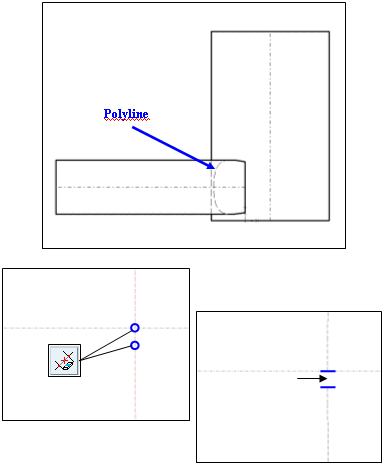
Polylines, such as for example occur when cutting two cylinders, are also split into "calculable" single segments with this function (circular arcs, ellipses, etc.).
As a group of single segments, the polyline can be edited and/or trimmed as well as imported to a CAD system with the "recognizable" properties.
In the example on the right (section greatly enlarged), the polyline [Polyline] can be broken up [Cut element between 2 elements] and trimmed using an element between 2 points [Cut element between 2 elements], for example.
Click on the Scale drawing icon to open the dialog box of the same name.
Enter the desired scaling factor [Scale factor] in the Value input field.
Optionally, activate the Create SCALE variable [Create variable SCALE].
-> The drawing is scaled and the Edit element docking window is opened.
You can adjust the scaling factor [Scale factor] and reference point [Reference point] X / reference point [Reference point] Y in the Edit element docking window.




![Drawing scaled with scaling factor [Scale factor] 1.5](https://webapi.partcommunity.com/service/help/latest/pages/en/installation_ecatalogsolutions/doc/resources/img/img_f10796b6817649e9b902f0002ad431f5.png)