
1.11.1.3. PARTwarehouse 1.11.1.3.2.
Analysis / duplicate search: Separate filters for search parts and result parts |  |
| Prev | Next |
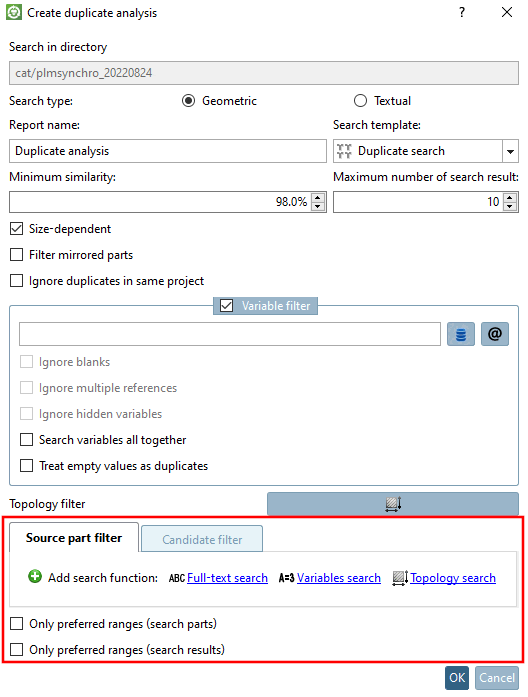
Previously, an analysis [Analysis] (make or buy, cost mockup [Cost mockup], suppliers [Suppliers] ) or duplicate search [Duplicate search] could not be carried out for a specific group of parts, as everything was filtered (search parts and result parts), not just the search parts.
Now with V12 SP4 the filter is divided into two tabs:
The filters available on both tab pages are full text search [Full-text search], variable search [Variables search] and topology search [Topology search]. The functions can also be used several times by clicking on Add search function.
The following examples show the new functions with the help of the duplicate analysis.
Example 1: Filtering the source parts to be used
For example, a variable search [Variables search] can be used to determine that the source parts to be used have e.g. MAT_NAME=Steel and that it does not matter for the candidates (perhaps no ERP number has been assigned yet).
![Variable search [Variables search]: MAT_NAME=Steel](https://webapi.partcommunity.com/service/help/latest/pages/en/installation_ecatalogsolutions/doc/resources/img/img_a430b25cd55543d396ceead28d199515.png)
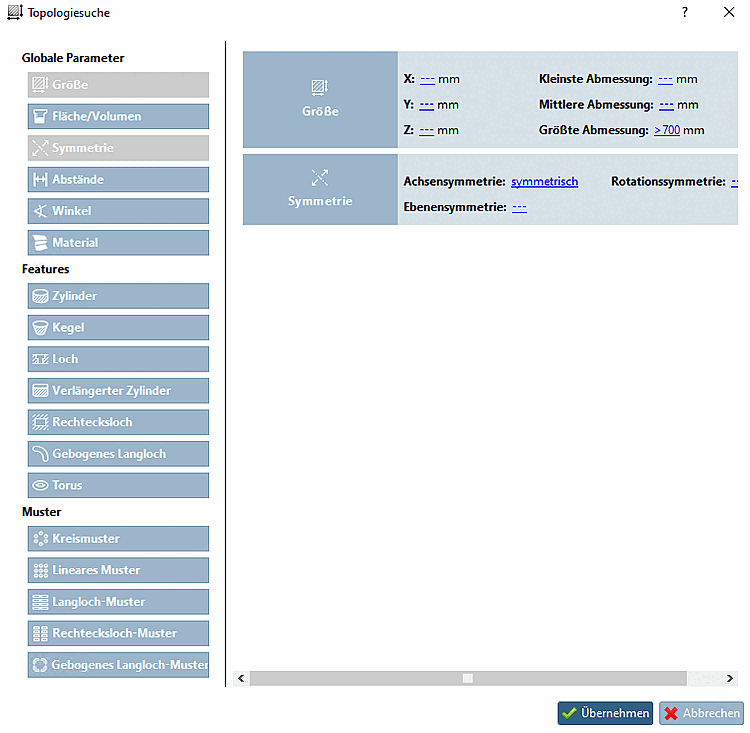
For example, you could also use a topology search [Topology search] to define a specific group of parts for which the duplicate search should be carried out (e.g. axially symmetrical parts larger than 700 mm).
Example 2: Filtering result parts
If, for example, you only want parts with drill holes in the result, set a search with Hole -> Quantity [Amount] > 0 on the Candidate filter tab page.

The functionality corresponds to the other standard search functions:
Details on full text search [Full-text search] can be found under Section 2.1.6.4.3.2, “ Full text search: Detailed search options ” in PARTsolutions - User.
Details on variable search [Variables search] can be found under Section 2.1.6.4.5, “ Variables search ” in PARTsolutions - User.
Details on topology search [Topology search] can be found under Section 2.1.6.4.11, “ Topology search ” in PARTsolutions - User.
Details on duplicate analysis can be found under Section 2.1.12.2, “ Duplicate Analysis ” in PARTsolutions - User