

You can access the settings dialog from PARTdataManager as follows:
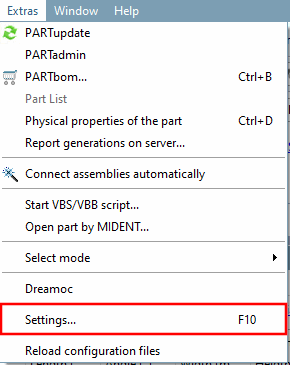

In the Settings dialog box, you have access to general settings that are used by various applications.[110]

In the menu on the left, select the desired settings area; the individual options are then displayed on the right.
Section 1.3.2, “ Line settings ” in ENTERPRISE 3Dfindit (Professional) - Administration
Section 1.3.3, “Tabbed page "Search" ” in ENTERPRISE 3Dfindit (Professional) - Administration
Section 1.3.4, “ Update notification " tab page ” in ENTERPRISE 3Dfindit (Professional) - Administration
Section 1.3.5, “ 3D settings ” in ENTERPRISE 3Dfindit (Professional) - Administration
Section 1.3.6, “Browser cookies ” in ENTERPRISE 3Dfindit (Professional) - Administration
Section 1.3.7, “Component comparison ” in ENTERPRISE 3Dfindit (Professional) - Administration
Section 1.3.8, “ Parts selection ” in ENTERPRISE 3Dfindit (Professional) - Administration
Section 1.3.10, “ Parts list ” in ENTERPRISE 3Dfindit (Professional) - Administration
Section 1.3.12, “ Table ” in ENTERPRISE 3Dfindit (Professional) - Administration
Section 1.3.13, “Register page "Transfer to CAD " ” in ENTERPRISE 3Dfindit (Professional) - Administration
Section 1.3.14, “ Assembly ” in ENTERPRISE 3Dfindit (Professional) - Administration
Section 1.3.15, “ 2D view ” in ENTERPRISE 3Dfindit (Professional) - Administration
Section 1.3.16, “Tabbed page "Logging settings" ” in ENTERPRISE 3Dfindit (Professional) - Administration
![[Note]](https://webapi.partcommunity.com/service/help/latest/pages/en/installation_ecatalogsolutions/doc/images/note.png) | Note |
|---|---|
If changes to the settings are not implemented immediately, click on in the dialog box at the bottom right or close the respective program and then restart it. | |
[110] In rare cases or for purely administrative settings, access may only be possible via a configuration file.