

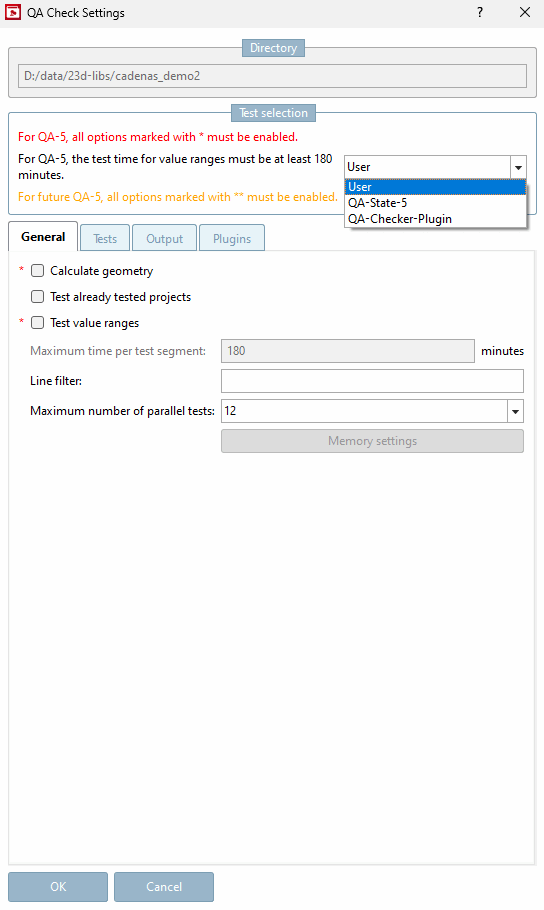
Calculate geometry: This function is used to test the characteristics (table rows) of all geometries (*.3db drawing files). Characteristics that lead to an "impossible" structure, such as a negative value for a width across flats, are logged as errors. The calculation process may take a long time (depending on the catalog size).
Retest projects that have already been tested [Test already tested projects]: If required, also tests projects that have already been tested. The following conditions apply:
The test is carried out when the
ProjektdatumorGeomDatedate newer than the Date in the filepnoreverse.cfgin the catalog root directory.The test is carried out if the project is an assembly and a component fulfills the above criteria.
A test is NOT performed if the QA status is marked as "Do not test". This is related to the user's QA role.
A test is NOT performed if (QA status >= 5) + (*.qacheck date = *.prj date) + (timeout=0 in the .qacheck file).
If there is a ReverseConfig for a project, then it is checked whether the order number can be found via the ReverseConfig.
If no ReverseConfig is available, the system checks from SP5 whether the Index order numbers depending on value ranges [Index order numbers dependent on value ranges] switch is activated.
See also Section 5.12.3.6.10, “Classification according to CNSORDERNO / CNSTYPECODE ”.
Maximum test time: Enter a maximum time value in minutes to be used per segment. If the time is exceeded, an entry is made in the log.
Line filter: Specify the lines that are to be filtered out of the evaluation later. For example 1,2,4-7,99.
Maximum number of parallel tests:
The initial display value (default value) corresponds to the available CPU cores (*2 for hyperthreading if available).
Leave this setting if there are no problems like a jerking mouse cursor, for example.
The reduction of parallel tests (CPU cores) by one or two (depending on the used machine), should leave enough performance for a trouble-free working.
However, be aware that a test itself can use multi-threading, so that using the half of cores does not automatically mean the use of half of the CPU. If also other CPU-intensive processes shall be started, then you have to consider theses, too.