
5.24.4.5.1. Configuration

In the AppServer runs a background task that is used to create indexes. if they are not compatible with the software version used. are compatible. The name of this task is UpgradeIndexTask. It can be used in the File pappserver.cfg configured .
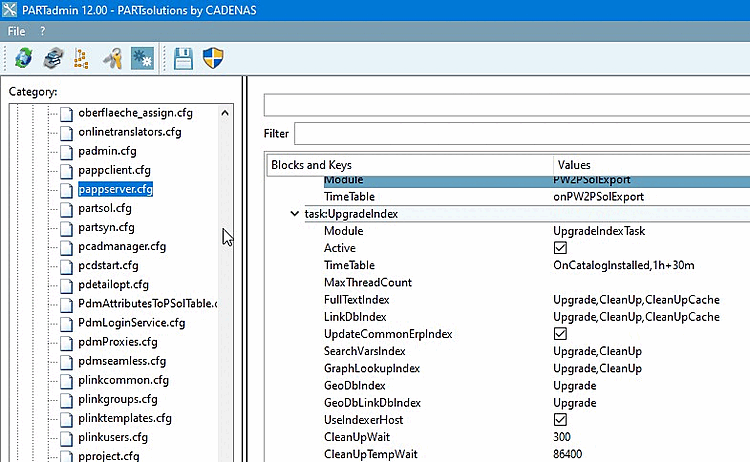
The " TimeTable " key can be used to control when the task should be executed. The " OnCatalogInstalled " trigger means that the task is started after a catalog installation. The specification “1h+30m” means that the task is also executed hourly — at 0:30, 1:30, 2:30, and so on.

For each index, you can specify which actions should be performed . The following actions are available:

Upgrade

This task checks whether the index version matches the software version. If it does not, the index is updated.

CleanUp

The task no longer deletes indexes that are no longer needed.

When an index is recreated, it is stored in a new subdirectory (with a new identifier) . The subdirectory with the old identifier can then be deleted.

For example, indextext_6omke6ohlb is replaced by indextext_ekhke4zmlx. In this case, indextext_6omke6ohlb can be deleted. However, the old directory is not removed immediately, but only after a short wait. The reason for this is that the search engine must first switch over to the new directory. The wait time is specified by the CleanUpWait key.

CopyCacheThe index is copied to the cache directory if a new index is present in the index directory. This applies only to the full-text search index and only if caching is enabled.
CleanUpCacheThe task deletes unnecessary indexes from the cache.