

Export options [Export Options] are saved in the configuration file exportdlls.cfg.
In order to ensure a consistent workflow it may make sense to set default values.
(No adjustments need to be made for the individual user, as their changes are written to the $CADENAS_USER/exportdll.cfg and will be available again the next time they are called up)
![[Note]](https://webapi.partcommunity.com/service/help/latest/pages/en/partwarehouse/doc/images/note.png) | Note |
|---|---|
You normally set defaults under The Here you set default settings under | |
In order to perform desired settings, best proceed as follows:
With a sample part, perform an export.
Open the corresponding configuration file
$CADENAS_USER/exportdlls.cfgand copy the block[RecentFiles]to the file of the same name under$CADENAS_SITESETUP(or create it), rename the block to[Settings]and delete any keys that are not required, especially those with paths.[Settings] DWG2D_OPTPAGEDWGEXPORT_solidColor=VAL{"1"} DWG2D_OPTPAGEDWGEXPORT_thinColor=VAL{"3"} DWG2D_OPTPAGEDWGEXPORT_hiddenLinetype=VAL{"dashed"} DWF2D_OPTPAGEDWGEXPORT_insertPointX=VAL{90} DWF2D_OPTPAGEDWGEXPORT_insertPointY=VAL{20} EPS_OPTPAGEEPS_thinWeight=VAL{"0.3"} CATV4IUA2D_OPTPAGEVECTOR_grouped=VAL{-1} CATV4IUA2D_OPTPAGEMETA2DV2_Rebase=VAL{0} DWG3D_OPTPAGEMETA3DV2_draft2sweep=VAL{1} DXF3D_OPTPAGEMETA3DV2_splitpattern=VAL{1} BMP_OPTPAGEIMAGE_Width=VAL{100} BMP_OPTPAGEIMAGE_Height=VAL{100} ...
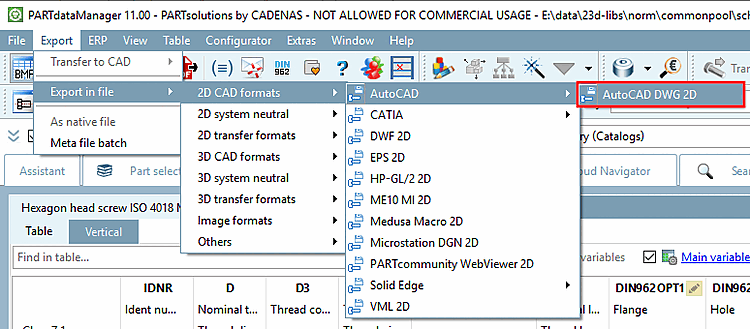
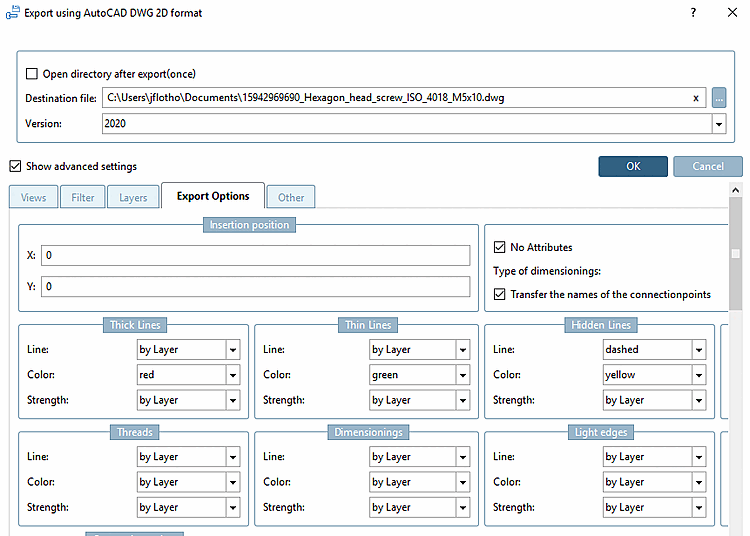
Settings off $CADENAS_USER/exportdlls.cfg and $CADENAS_SITESETUP/exportdlls.cfg are merged. If there is a conflict, the setting under $CADENAS_USER/exportdlls.cfg.