
 |
Via dw files, you can create special views for 2D derivations.[48]
As of V9.08 SP0 it is possible to create cut 2D views via dw files.
Therefor specify sectional plane, direction of the cut (1/-1) and optionally offset in the block Template.
[Template]
cutPlaneType=XY
cutPlaneDirection=1
cutPlaneDistance=0.0
Under "order" enter the desired view(s) to be displayed:
[ELEMENT_grid1]
type=grid
padding_x=10
padding_y=10
padding_unit=percent
columns=2
rows=1
order=back,left
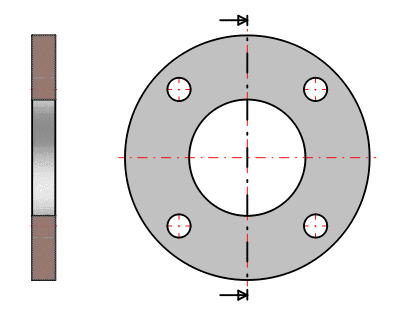
Example: On the left side the top view on the sectional plane, on the right side a side view on the sectional plane. In the side view a dotdashed line is displayed to mark the plane, arrows show the direction of view.
![[Note]](https://webapi.partcommunity.com/service/help/latest/pages/en/partwarehouse/doc/images/note.png) | Note |
|---|---|
The dw definition has priority before the manual definition. It is only possible to enable the cut for the whole drawing, it applies for all views. | |
[48] Details can be found under Section 7.11, “Docking window "2D derivation" - Create own Combination views (*.dw) ” in eCATALOGsolutions Manual.