
7.11. Docking window "2D
derivation " - Create your own combination views (*.dw)
7.11.3. [Template]
with basic information |  |
| Prev | Next |
![[Note]](https://webapi.partcommunity.com/service/help/latest/pages/en/partwarehouse/doc/images/note.png)
It contains the following attributes:
Name is the unique identifier for this sketch view. In other words, there may not exist another one by the same name.
Indicates the basic unit in which the sketch view is defined.
hide (set the attribute yourself if necessary)
With "hide=1" you can prevent the template from being displayed under PARTdataManager -> 2D derivation -> Combination views.
[Template]
name=datasheet
unitbase=mm
hide=0/1
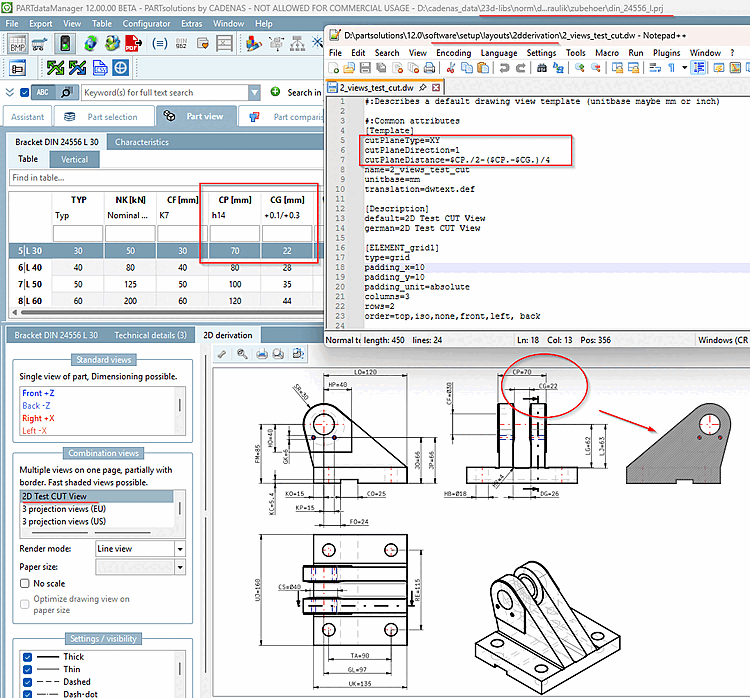
You can also use cuts in 2D views.
To do this, declare the section plane, direction of the section (1/-1) and optionally a shift in the Template block.
[Template]
cutPlaneType=YZ
cutPlaneDirection=1
cutPlaneDistance=0.0
You can also use complex expressions with variables.
[Template]
cutPlaneType=XY
cutPlaneDirection=1
cutPlaneDistance=$CP./2-($CP.-$CG.)/4
Under "order", enter the desired views to be displayed:
[ELEMENT_grid1]
type=grid
padding_x=10
padding_y=10
padding_unit=percent
columns=2
rows=1
order=back,left
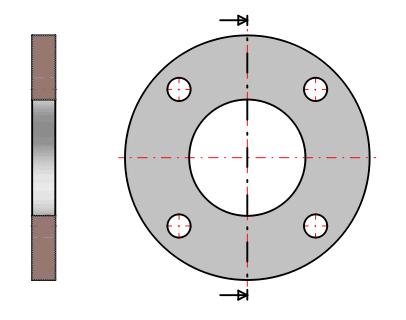
Example: On the left is a top view of the section plane; on the right is a side view of the section plane. In the side view, a dashed line indicates the section plane, and arrows show the direction of view.