1.7.4.3.  Create variant in PARTlinkManager

In order to create a variant in PARTlinkManager, do the following:

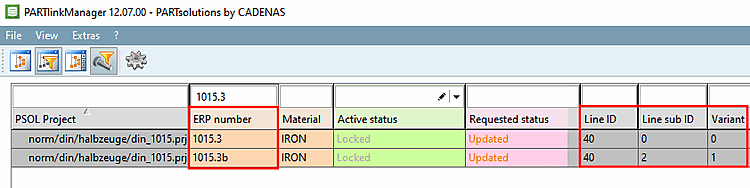
  1. Mark the desired row in PARTlinkManager.

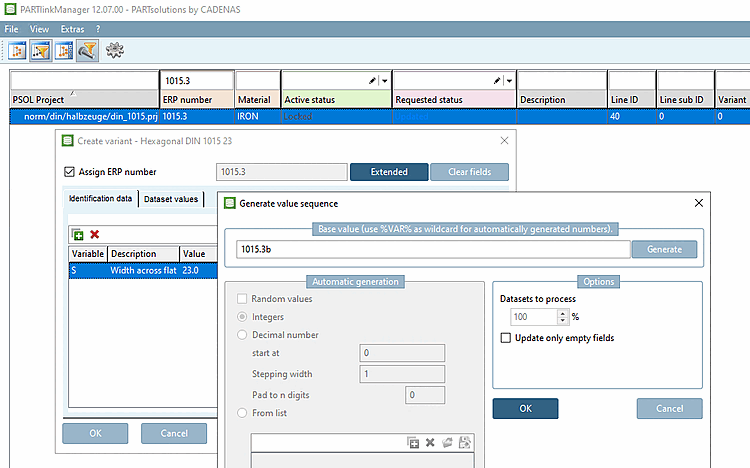
  2. Via the context menu open the command Create variant.

    --> The window with the same name opens.

  3. Activate the control box Assign ERP number.

    --> The Extended button is activated.

  4. Click on Extended.

    --> The window Generate value sequence opens.

  5. Enter the desired number for the variant.

  6. Confirm with OK.

  7. The window Create variant shows up.

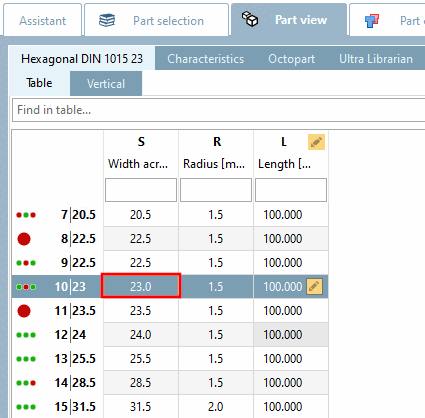
  8. Edit the desired variable (in this example 'D')

  9. Confirm with OK.

  10. --> The variant shows up as a new row in PARTlinkManager

    The variant is managed in the LinkDB/PLDBDEMO with the same Line ID but with a different Line sub ID [19].

  11. Control the display in the PARTdataManager.

    The variants with changed thread diameters are shown next to their original geometries.


[19] Information about variants can be found under Section 1.7.1.3.2, “Internal treatment of variants”.