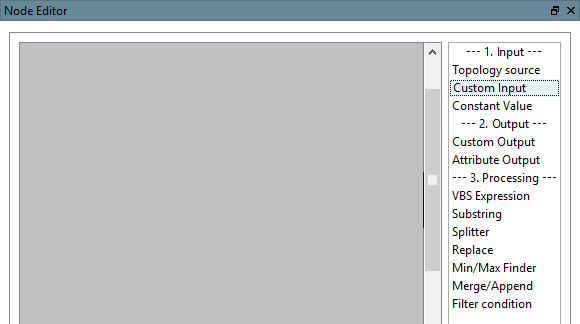
In the node editor on the right-hand side, you will find the individual nodes with which you can configure a "Pipeline in the pipeline".
A pipeline consists of input [Input], output [Output] and processing [Processing].
Topology source: You can directly access certain topological properties in the corresponding dialog box.
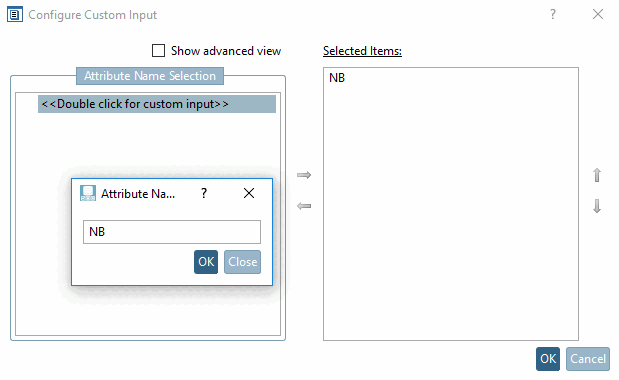
Double-click on the entry under Select attribute name [Attribute Name Selection] and enter the desired attribute name in the input field. If you confirm with , this is automatically entered under Selected elements.
The Show extended view [Show advanced view] option is only intended for experts.
Constant value [Constant Value]:
You can find a small usage example under Filter condition.
VBS Expression [VBS Expression]:
Expressions of unlimited complexity can be used.
Simple example with option Process single values: (If the input is "Double" values (e.g. for "Value.Number", not "Value.Text"), this option can be used)
Process input data directly [Process raw input]: Here, the input would be a container (such as a list). (In this case, a simple "+1" would not work)
In the list field following options are found:
Example: The following setting can be used to filter out a file name from a path specification.
Split [Splitter] splits a string into individual elements using a separator.
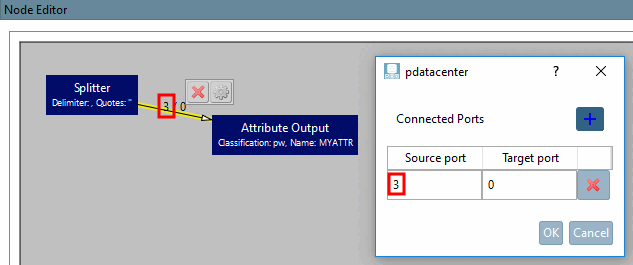
If you want to process all elements of a list in a node, you should activate the option Output all elements as a list [Output all items as list], otherwise you can have a specific element of the list passed on using the port setting:
Assuming you have the string "A,B,C,D,E" and want to pass on "D", you would have to deactivate the option Output all elements as a list [Output all items as list], set the separator "," and set the source port in the continuing edge to 3 (index of the value; 0 = A, 1 = B, ...). (Quotation marks are useful here if the separator also appears in the value (e.g. "'A,A','B,B'")
Min/Max Finder [Min/Max Finder]:
Example: If, for example, the topology value "Inner cylinder" is read out, this may contain several values. The largest or smallest value can then be used.
You can find a small usage example under Filter condition.
General rule: Input[0] = Value to check the condition, Input[1] = Value to pass, if condition matches.
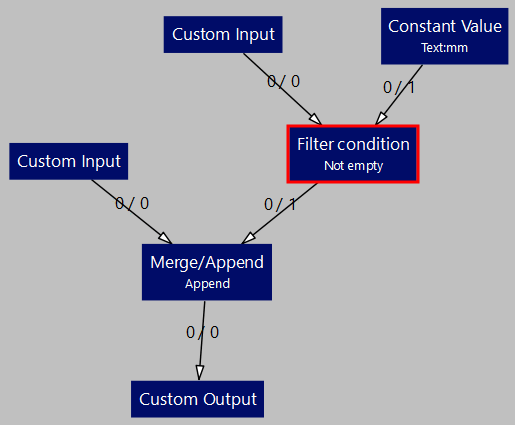
Example with filter condition "Not empty [Not empty] "
If the filter condition is fulfilled (i.e. the value under User-defined input ) is not empty, the constant value "mm" is to be passed on. This is then appended to the numerical value from User-defined input using the Merge/Append node.
![Configure topology source [Topology source]](https://webapi.partcommunity.com/service/help/latest/pages/en/ecatalogsolutions/doc/resources/img/img_4e22d68594914620881b3b576f33afe8.png)
![configure "Constant value [Constant Value] "](https://webapi.partcommunity.com/service/help/latest/pages/en/ecatalogsolutions/doc/resources/img/img_9c28fee855b8448c8c8c7dc4db4d1f55.png)
![configure "Output attribute [Attribute Output] "](https://webapi.partcommunity.com/service/help/latest/pages/en/ecatalogsolutions/doc/resources/img/img_a98737b8afc5495890404de3b242e87a.png)
!["Configure "VBS Expression [VBS Expression]](https://webapi.partcommunity.com/service/help/latest/pages/en/ecatalogsolutions/doc/resources/img/img_263b1ea44b6e4ae2906fe247e2e6cef8.png)
![configure "Substring [Substring] "](https://webapi.partcommunity.com/service/help/latest/pages/en/ecatalogsolutions/doc/resources/img/img_307f91d8636242729235f6b7138500ee.png)
![configure "Split [Splitter] "](https://webapi.partcommunity.com/service/help/latest/pages/en/ecatalogsolutions/doc/resources/img/img_c18474480ab24fb394fe11df014b3e4f.png)
![configure "Replace [Replace] "](https://webapi.partcommunity.com/service/help/latest/pages/en/ecatalogsolutions/doc/resources/img/img_f832b86b97024259898c439f18f05321.png)
![configure "Min/Max Finder [Min/Max Finder] "](https://webapi.partcommunity.com/service/help/latest/pages/en/ecatalogsolutions/doc/resources/img/img_09adab6371ca4c85ac999e199f646c8a.png)
![configure "Merge/Append [Merge/Append] "](https://webapi.partcommunity.com/service/help/latest/pages/en/ecatalogsolutions/doc/resources/img/img_a07644675036478a9de34e8b750351f4.png)
![configure "Filter condition [Filter condition] "](https://webapi.partcommunity.com/service/help/latest/pages/en/ecatalogsolutions/doc/resources/img/img_6bfec240e5d44a558a9e4eefe593830f.png)