
5.23.8.2.2. Request with simple attachment in the Part Number Manager 5.23.8.2.2.1. Configuration |  |
| Prev | Next |
In the "VARS" block, set the "PARTREQUEST_CREATE" key to False (0). The request is then written to the DB.
[VARS]
PARTREQUEST_CREATE = 0
The setting under WEB_ACTIONS is fundamental, both for users [here in the example role "Designer"] and for the administration or standardization body or key user (depending on the company workflow) [here in the example role "Admin"].
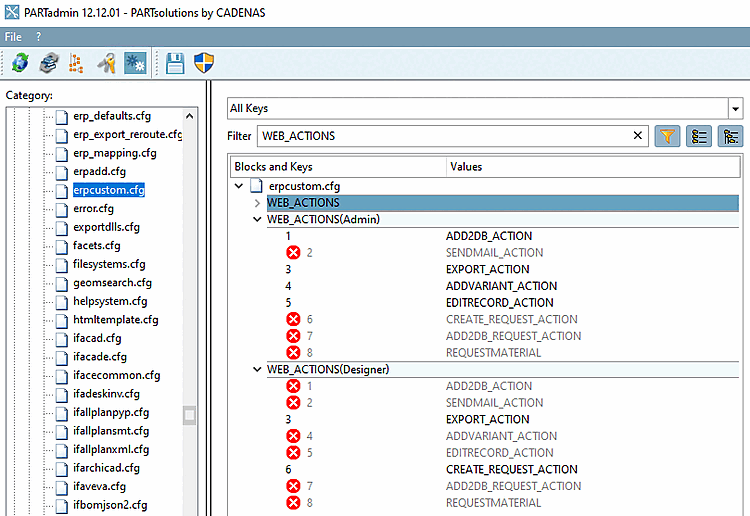
The user only has the CREATE_REQUEST_ACTION button (6) visible (and the export button). This calls up a creation dialog where the user can, for example, select the desired material and enter a comment.
[WEB_ACTIONS]
3= EXPORT_ACTION
6=CREATE_REQUEST_ACTION
The admin has the option of creating new rows (1), creating variants (4) or fully editing a data record using EDITRECORD_ACTION (5).
[WEB_ACTIONS]
1= ADD2DB_ACTION
3= EXPORT_ACTION
4= ADDVARIANT_ACTION
5= EDITRECORD_ACTION
Specifications for the button or the function behind it are made via the block of the same name. For example, the displayed icon [Icon] or the label of the button [Description] is defined here.
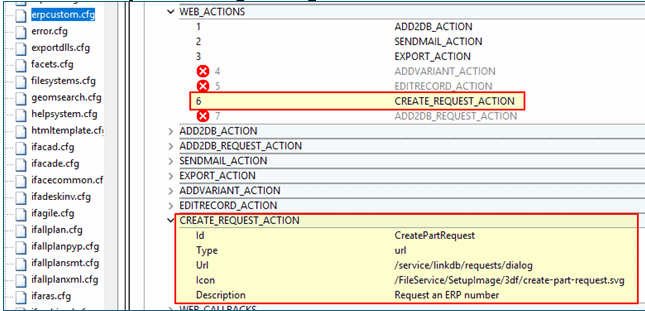
CREATE_REQUEST_ACTION - Button
 /
/ 
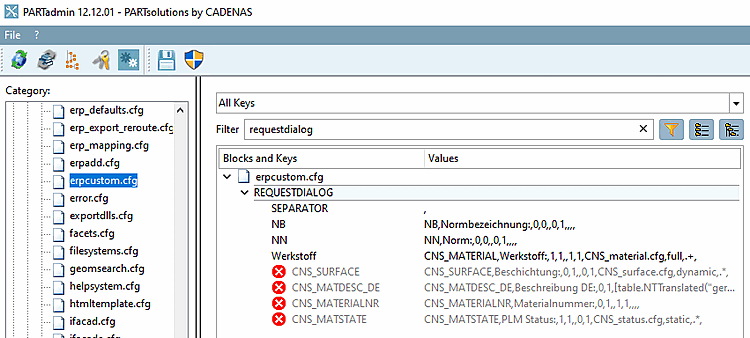
The button opens the following dialog:
Create a part ident request (de and en same display) - details can be found at Section 5.23.8.2.2.2, “Procedure”.
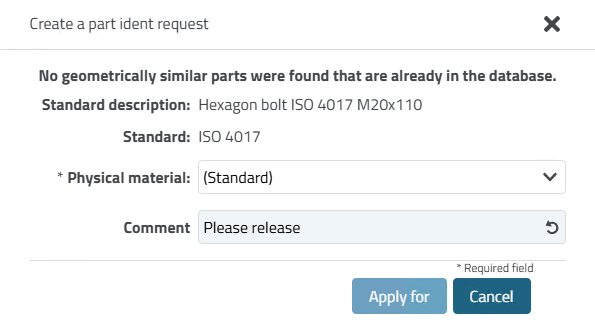
The dialog for requests is created in the [REQUESTDIALOG] block (similar to [USERDIALOG]).
[REQUESTDIALG]
Werkstoff= CNS_MATERIAL,Werkstoff:,1,1,,1,1,CNS_material.cfg,full,.+,
As a rule, fewer fields are displayed here than in the [USERDIALOG] block, as the requesting user does not need many of them and is not allowed to set them.
The [USERDIALOG] block is used for processing by the admin, standards body and key user.
![[Note]](https://webapi.partcommunity.com/service/help/latest/pages/en/installation/doc/images/note.png)
Note The [USERDIALOG] block is always used in the workflow at Section 5.23.8.2.3, “Request with attachment in the Part Number Manager plus LinkDB entry ” and specifications are always made via roles.
![Input window "Apply for ID number [Create a part ident request]" according to the above setting](https://webapi.partcommunity.com/service/help/latest/pages/en/installation/doc/resources/img/img_a8016257cc1f4dfdb707a5867a3be29b.png)