
 |
With PARTdesigner and PARTeditor united in one application (under PARTdesigner) with ONE Variable Manager you will work more productive. Docking windows allow easy handling like in PARTdataManager.
The two following figures show once the default view with 3D History and once the view with opened Sketch history and Sketcher.
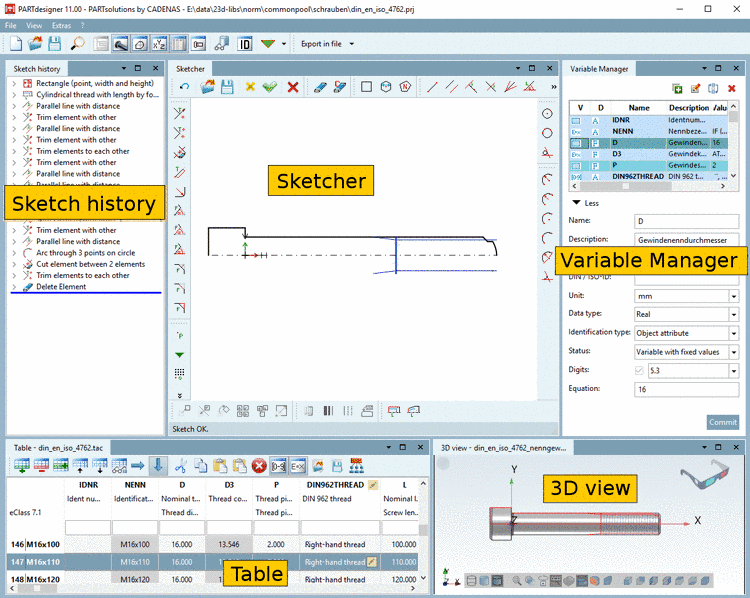
In the Sketcher view the 3D view is displayed in small in addition (see above).
When selecting the sketch, the relation to corresponding plane is displayed.
All information is summarized in a table. Value and Unit are displayed directly beside the variable names.
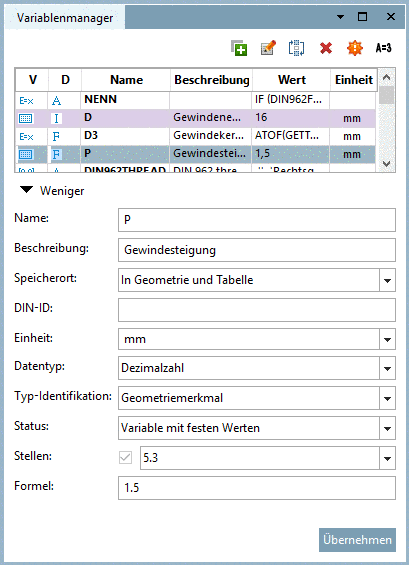
In order to add
new variables expand the dialog area by clicking on  More, then you can use the
button.
More, then you can use the
button.
Under Save location you can set whether the respective variable shall be saved in the mode Only in geometry, Only in table or In geometry and table.
The table contains the same new layout as PARTdataManager.
A detailed documentation on the new PARTdesigner can be found under Chapter 7, PARTdesigner in eCATALOGsolutions Manual.
An example on part creation with the new PARTdesigner can be found under Training - Erstellen einer Hutmutter.