

![[Note]](https://webapi.partcommunity.com/service/help/latest/pages/en/partsolutions_user/doc/images/note.png) | Note |
|---|---|
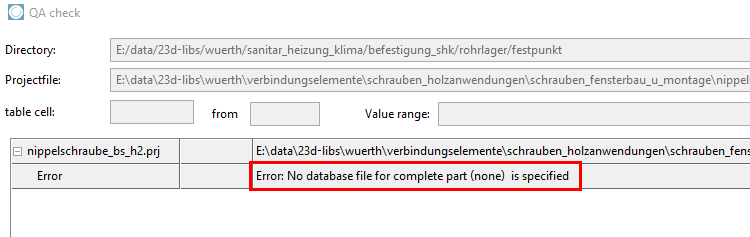
The entry of at least one 3D model is mandatory! If no 3db file is specified, the corresponding error message appears in the TestMeta in the QA Check [QA-Check] dialog box.
Optionally, you can use the Variants dialog area if you want to assign specific 3D models to different variable values (table rows). | |
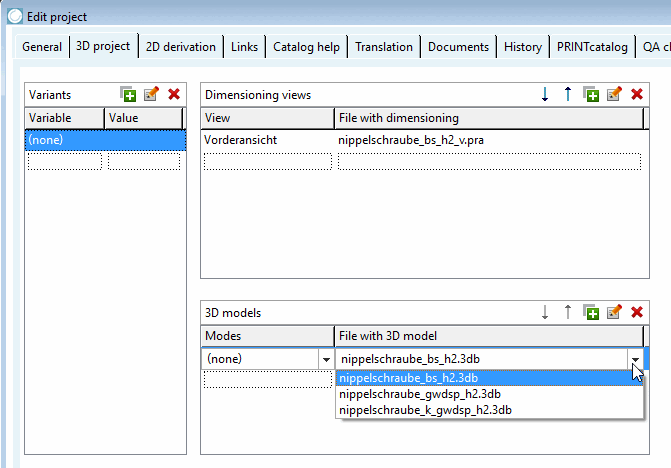
Under File with 3D model in the (none) line, use the list box to select the desired 3db file.
Many screws (especially in the standard catalog, but not only) still have two modes [Modes] (nominal thread [Nominal thread] and core hole [Core diameter] ). In such cases, the PARTdataManager only nominal thread [Nominal thread] is displayed! Core hole [Core diameter] is no longer used!
Nominal threads [Nominal thread] are always created as standard for new catalog systems!
![Nominal thread " and "core hole [Core diameter] " modes [Modes]](https://webapi.partcommunity.com/service/help/latest/pages/en/partsolutions_user/doc/resources/img/img_6a44691967b44adca6fea8820704234b.png)