
5.9.2.3. Menu item: Variables
5.9.2.3.1.
Variables without list selection in vertical table
|  |
| Prev | Next |
This option allows you to explicitly exclude variables for the list selection, such as feature algorithms or fixed variables (e.g. weights, if filtering such parameters does not make sense).
You can easily set the list selection for all variables of a catalog or project via the variable management [Variable Management].
Right-click on a catalog or project > Automation > Manage Variables [Manage variables] to open the dialog box .
There, in the " Without List Selection in Vertical Table [Without list selection in vertical table] " column, you can select the checkbox. When you click and then , the variable is transferred to the " Variables without List Selection in Vertical Table [Variables without list selection in vertical table] " field on the Tabbed [General] page.
![[Note]](https://webapi.partcommunity.com/service/help/latest/pages/en/ecatalogsolutions/doc/images/note.png) | Note |
|---|---|
As the name of the line is very long, most of it is hidden. You can see the entire name as a tooltip via mouseover. | |
![Variable management [Variable Management]](https://webapi.partcommunity.com/service/help/latest/pages/en/ecatalogsolutions/doc/resources/img/img_b53dbbb8b1704d94a989b53a9ff1a64e.png)
Alternatively, you can also proceed as follows:
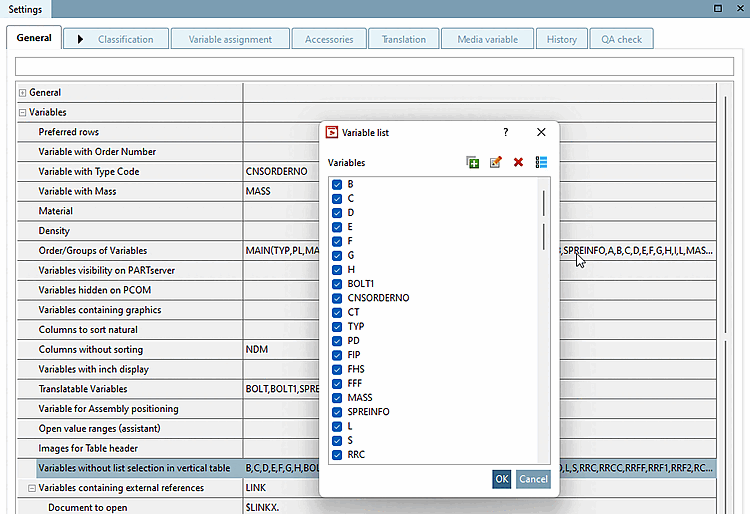
Under Settings → General → Variables → Variables without list selection in vertical table, click on the Browse button
Activate the checkbox for all desired variables and then confirm with .
→ The list field selection is now deactivated for the specific variables.
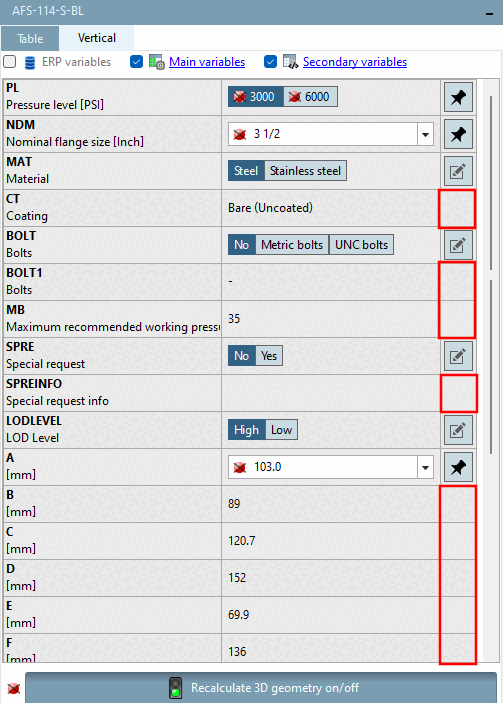
Check in PARTdataManager the result.
No buttons are displayed for the relevant variables


 are no longer displayed. Filtering is no longer possible.
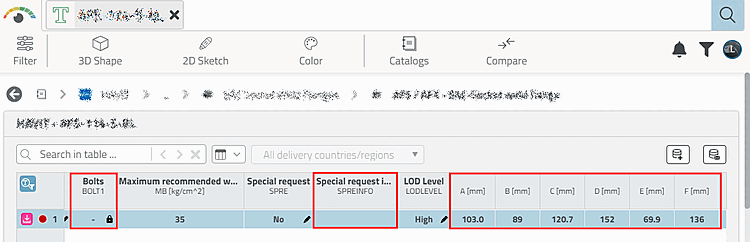
3Dfindit no longer offers a filter option either. The editing icon is missing
 .
.
| ||||