4.3.3.3.2.1. Mapping between entries in the .pax file and ifnxteamcenter.cfg
[Note]Note

This description of a minimal configuration assumes that a simple template without Teamcenter required attributes is used. For a complex example with required attributes, see Section 4.3.3.3.4.3, “Teamcenter Required Properties”.

The customer must specify which pax file and which entry within it is being used .

On this basis, the assignment can be made.

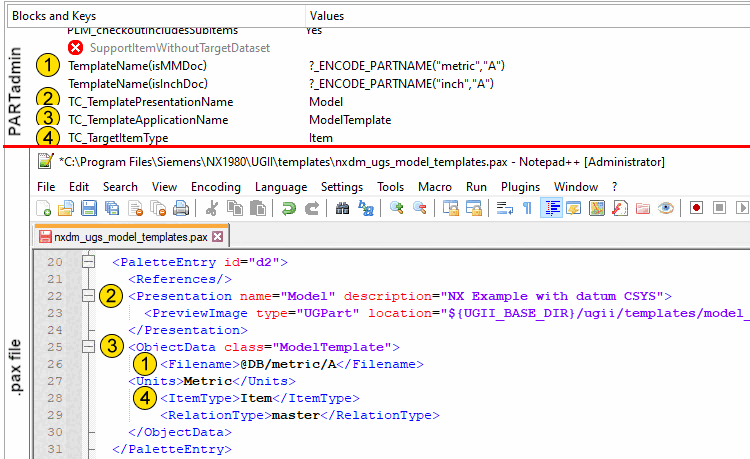
  1. Open the pax file you're using in a text editor, and next to it, open PARTadmin -> ifnxteamcenter.cfg -> Block "CreationOptions(is3d).

  2. Wear In the configuration file, you ifnxteamcenter.cfg the respective values from the pax file.

    [Note]Note

    The spelling must match exactly that in the pax file. Be sure to use the correct upper- and lowercase letters! We recommend copying and pasting!

    Key:

    • TemplateName(isMMDoc)

    • TemplateName(isInchDoc)

    • TC_TemplatePresentationName

    • TC_TemplateApplicationName

    • TC_TargetItemType

    • TC_allowItemAltRep

      [Note]Note

      The entry may be missing. In that case, the default value "false" is used automatically.

    PARTadmin <-> .pax file

    PARTadmin <-> .pax file

    The following table shows the schema:

      PARTadmin -> ifnxteamcenter.cfg -> PLM block -> Key Value nxdm_ugs_model_templates.pax -> TAG (Attribute)
    TemplateName(isMMDoc)

    ?_ENCODE_PARTNAME("metric","A")

    <Filename>
    TC_TemplatePresentationNameModel (in this example, the name of a simple template)<Presentation name=...>
    TC_TemplateApplicationNameModelTemplate<ObjectData class=...>
    TC_TargetItemTypeItem<ItemType>
    TC_allowItemAltRepFalse (default)<ShowAltRep>