

 | Note |
|---|---|
The server must already be set up and running. The server and client must be compatible, but they do not necessarily have to be at exactly the same service pack or patch level .[92] | |
In V12, access to CADENAS_DATA, CADENAS_SETUP, and CADENAS_SITESETUP via the AppServer has been improved. Access to CADENAS_SETUP and CADENAS_SITESETUP via the AppServer has been accelerated.
Another new feature is that all client applications now use the RemoteFileSystem, provided it is enabled on the client. Previously, this was only the case for PARTdataManager.
Operation If the ENTERPRISE 3Dfindit Client and AppServer are running on the same computer, neither RemoteFileSystem nor Remote-Index is used. In this case, access to CADENAS_DATA is via the file system.
Access via RemoteFileSystem is read-only. If you plan to use PARTadmin or PARTlinkManager on the client, RemoteFileSystem should not be enabled on the client.
This access should only be used, for example, to modify configuration files. The user must then have the appropriate permissions.
This access is not suitable for catalog/classification updates and index management. See below for more information.
Whether the RemoteFileSystem should be enabled on the client can be specified during installation.
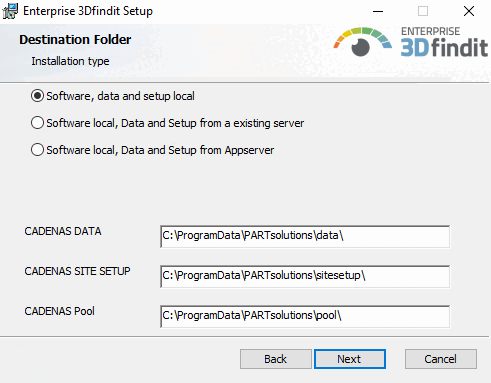
If " Software" "Local, Data, and Setup " is selected for the application server, the RemoteFileSystem is used.
Under " Appserver URL," enter the HTTPS string with the exact server name and the HTTPS port that you entered on the server under AppServer Service [AppServer Service] > Tabbed page > Port Configuration [Port configuration] > HTTPS Port [HTTPS-Port].
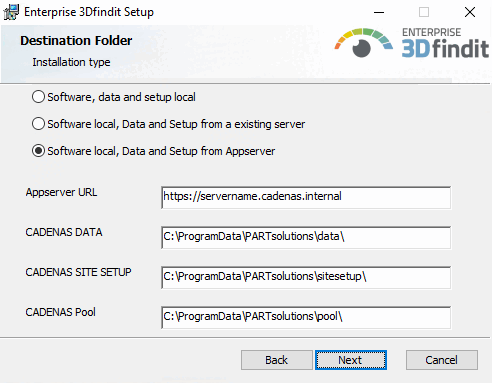
Example: Software local, Data and Setup from Appserver (in other words the RemoteFileSystem is used)
Example (excerpt from start.env):
CADENAS_APPSERVER=https://SERVERNAME.cadenas.internal?mzcomsport=9025&sslport=447
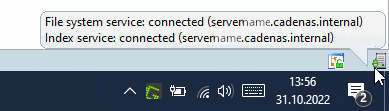
As soon as
the client is successfully connected, is displayed in the taskbar at the bottom right
the
 File System Service [File system service]
Connected / Index Service [Index service]
Connected icon is green.
You can find detailed documentation on the various installation types under " Section 4.5.1, “Different installation scenarios” in Installation."
See also Section 5.24.3.7, “ Automatic Login ”.